While setting up a single-node GPU workload with Kubernetes Dynamic Resource Allocation (DRA) is relatively straightforward, the real challenge begins when transitioning to production at scale. In a single-node sandbox, the primitives are clean, the YAML behaves predictably, and a working ResourceClaim can typically be established in a single afternoon. However, when workloads scale across multiple nodes, distributed training jobs demand physical interconnect affinity, autoscaling models must align with pre-allocated capacity blocks, and nodes must gracefully handle mid-job GPU failures without disrupting other co-located workloads. The sections that follow focus on these critical operational edge cases, exploring how to build topology-aware clusters, navigate the current boundaries of GPU autoscaling, implement robust Day-2 observability, and isolate faults at the device level.
1. Topology-Aware Scheduling in Kubernetes - ComputeDomains and NVLink
Why Distributed Training Fails Without GPU Topology Awareness
Distributed training workloads depend heavily on collective communication operations such as AllReduce, AllGather, and ReduceScatter that continuously move gradient data between GPU workers throughout each training step. The bandwidth available for these operations dictates how long each training step takes. On modern A100 and H100 systems, aggregate NVLink bandwidth can exceed several hundred GB/s depending on the topology, cluster behavior, and specific hardware generation. When the scheduler places workers on nodes that do not share a physical NVLink fabric, communication falls back to PCIe or standard Ethernet, dropping the available bandwidth to 64 GB/s or lower.
Most platform teams first notice this issue as highly inconsistent step times. The training job technically succeeds without throwing errors, but overall throughput collapses once communication leaves the high-speed NVLink fabric. Under the legacy Device Plugin model, the Kubernetes scheduler lacked a native mechanism to evaluate physical GPU interconnects. As a result, a 16-GPU training job can easily land across four disconnected nodes. Engineers historically had to resort to manually encoding topology knowledge into brittle, node-specific nodeAffinity rules that broke whenever hardware changed.
The ComputeDomain Custom Resource Definition
The NVIDIA DRA driver introduces the ComputeDomain Custom Resource Definition (CRD) to solve placement awareness at the scheduler level. A ComputeDomain represents a verified set of nodes sharing physical NVLink connectivity. When a ResourceClaim references a ComputeDomain, the DRA driver validates that allocated devices belong to the same discovered, physically NVLink-connected topology domain before scheduling completes. Behind the scenes, the driver automatically orchestrates Inter-Module Execution (IMEX) channels, which provide the messaging infrastructure required for cross-node NVLink communication domains at rack scale
For architectures like the NVIDIA Grace Blackwell GB200 NVL72, which connects up to 72 GPUs via Multi-Node NVLink across a full rack, this automation is essential. Without topology guarantees, placing a trillion-parameter training job on a GB200 cluster is highly risky, as it exposes the workload to communication paths with severe bandwidth constraints. The DRA driver abstracts this complexity, allowing scheduling decisions to incorporate verified topology information before workloads are placed.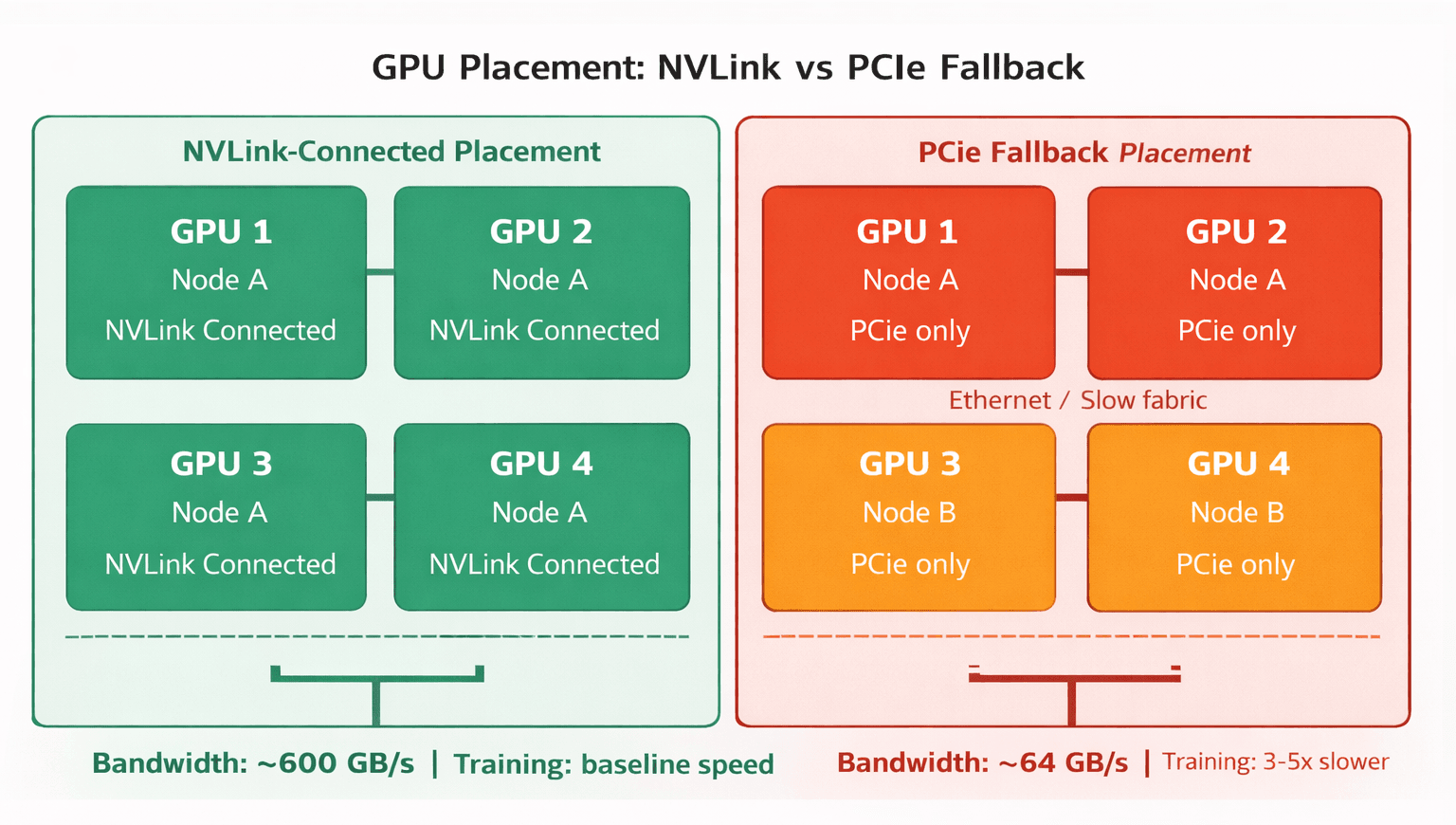 NVLink-connected placement (left) vs PCIe fallback (right) - the scheduling decision that determines training throughput.
Topology Constraints in a ResourceClaim
The CEL (Common Expression Language) expression below checks that the computeDomain attribute is populated something the NVIDIA DRA driver only sets on nodes with verified NVLink fabric. The scheduler evaluates this against live ResourceSlice data, eliminating manual topology annotations from pod manifests :
ResourceClaim - NVLink topology constraint:
| apiVersion: resource.k8s.io/v1 kind: ResourceClaim metadata: name: nvlink-training-claim namespace: ml-workloads labels: app.kubernetes.io/name: distributed-training app.kubernetes.io/part-of: llm-pipeline spec: devices: requests: - name: gpu deviceClassName: gpu.nvidia.com selectors: - cel: expression: > has(device.attributes['gpu.nvidia.com'].computeDomain) && device.capacity['gpu.nvidia.com'].memory.isGreaterThan(quantity('40Gi')) |
Note: Attribute naming may vary slightly across NVIDIA DRA driver releases. ComputeDomain setup requires the IMEX daemon running on each participating node before the ResourceClaim is submitted. The DRA driver daemonset handles this automatically when ComputeDomain support is enabled during Helm installation. Confirm daemon status on newly added nodes before submitting large training jobs.
2. Kubernetes GPU Autoscaling: Karpenter Limitations with DRA
Most teams approaching DRA for the first time assume that dynamic resource allocation implies dynamic node scaling. However, in practice, the operational reality is more constrained, and building an infrastructure strategy around incorrect autoscaling assumptions has direct consequences on cluster efficiency.
Why Karpenter Cannot Scale DRA Workloads Today
Karpenter's scheduling simulation evaluates whether a pending pod can run against a hypothetical, not-yet-launched node instance type. For CPU and memory workloads, this process is straightforward because the instance's resource profile is statically defined. DRA changes this equation. A pending pod with a ResourceClaim requires the scheduler to evaluate CEL expressions against a ResourceSlice structured hardware topology data that only exists on a running node. Karpenter would need to synthesize hypothetical ResourceSlices for each cloud provider instance type and simulate CEL evaluation against those synthetic slices.
This is the core of Karpenter Issue #1231, representing significant engineering work that has not yet landed in a stable release. Until this capability is integrated, Karpenter has no native way to determine whether a pending DRA workload would successfully schedule on a newly provisioned node. Consequently, attempting to autoscale DRA workloads dynamically using standard Karpenter configurations can leave pods permanently stuck in a Pending state.
Managing Static Capacity Reservations
In a shared GPU cluster, scheduling workloads without strict topology and size awareness quickly leads to resource fragmentation. Imagine an eight-GPU node where several small, single-GPU inference or development workloads are scheduled dynamically. If three different users spin up isolated containers, they might be assigned three random GPUs on the same physical host. While this utilizes the individual devices, it breaks the contiguous NVLink clique.
When a large-scale, distributed training job subsequently enters the queue requesting the full eight-GPU NVLink domain, the scheduler cannot place it on this node, even though five GPUs are technically idle. The large job is forced to wait in a Pending state, creating substantial queue backpressure and scheduling contention. Over time, this contention leads to severe cluster underutilization, where multi-GPU training jobs stall indefinitely because the high-speed interconnect paths are fragmented by small, isolated claims.
Why GPU Pool Fragmentation Breaks Distributed Training
What Works in Production Today
| Approach | DRA Compatible | Cost Model | Operational Complexity |
|---|---|---|---|
| Karpenter Dynamic Autoscaling | No - CEL simulation unsupported | Variable - on-demand | Low setup, high DRA risk |
| Static Managed Node Groups | Yes - full DRA support | Fixed - aligns with Capacity Blocks | Medium setup, reliable |
| Karpenter Static Capacity v1.8.1+ | Partial - baseline only | Fixed baseline | Medium setup, limited scaling |
For production DRA deployments today, static Managed Node Groups or Karpenter's spec.replicas-based static capacity feature are the reliable approaches. The community is actively working toward full Karpenter DRA support, but production strategy should not depend on a timeline that is not yet confirmed.
Once you have established a stable capacity model and scheduled your workloads, the immediate operational priority shifts from provisioning to performance. Having an allocated GPU does not automatically mean it is running your code; therefore, the next critical step is implementing a Day-2 observability stack to monitor runtime efficiency and validate that your expensive hardware is actually doing useful work.
3. Runtime and Scheduling Observability: DCGM Metrics Under DRA
DCGM Metrics That Matter Under DRA
The NVIDIA Data Center GPU Manager (DCGM) Exporter remains the standard for per-device telemetry, but the interpretation of its metrics changes when devices are allocated through ResourceClaims rather than direct device plugin assignment:
DCGM Metrics That Matter Under DRA
The DCGM Exporter remains the standard for per-device telemetry, but the interpretation of its metrics changes when devices are allocated through ResourceClaims rather than direct device plugin assignment.
- DCGM_FI_DEV_GPU_UTIL (SM Utilization): A running pod with a resolved ResourceClaim showing 0–5% utilization is a classic indicator of a workload-level configuration bug, such as a missing CUDA context initialization or unset runtime environment variables, rather than a scheduling failure.
- DCGM_FI_DEV_MEM_COPY_UTIL (Memory Bus Bandwidth): High SM utilization paired with an elevated memory copy percentage signals a data-bound bottleneck.If you see this in LLM inference, it often indicates the KV cache is thrashing and getting evicted, forcing the container to continually reload weights from host memory.
- DCGM_FI_DEV_FB_USED (Framebuffer Usage): Comparing actual VRAM usage against the memory limits declared in your ResourceClaim is the primary method for validating scheduler accounting.1 If this metric consistently drifts above the claimed limits, it indicates that the scheduler's capacity allocation boundary is being bypassed, leading to out-of-memory (OOM) risks on co-located workloads.
ResourceClaim Allocation State as an Observability Signal
A dimension of DRA observability that is frequently overlooked is the ResourceClaim status itself. The allocation state of every claim is visible directly through the Kubernetes API:
| kubectl get resourceclaim <claim-name> -n <namespace> -o yaml |
A healthy allocated claim shows a populated .status.allocation field containing the device UUID and node name the scheduler selected. A claim where .status.allocation remains empty while the associated pod is Pending is a direct diagnostic signal - the scheduler could not satisfy the CEL constraints. The reason surfaces on the claim object itself, not in pod events or scheduler logs. This is a meaningful operational improvement over the Device Plugin era.
4. GPU Fault Isolation: Locally Evicting Failed Devices with DeviceTaintRules
Surgical Localized Eviction
When a GPU fails under the legacy device plugin model, the standard response was to cordon the entire node evicting every active workload regardless of whether their allocated GPUs were healthy. On an eight-GPU node running multiple inference services, a single device failure took seven healthy GPUs offline unnecessarily. Device taints and tolerations, moving to Beta in newer Kubernetes releases through the resource.k8s.io API family, solve this by enabling device-level fault isolation
The NVIDIA DRA driver monitors each device continuously via NVML. When an unrecoverable XID error is detected, the driver applies a NoExecute taint specifically to that device's entry in the ResourceSlice, rather than cordoning the entire node. Under this model, pods allocated to the affected device become candidates for eviction while workloads on neighboring healthy devices continue running uninterrupted. Cluster administrators can also manually apply taints by creating a DeviceTaintRule, which is invaluable for taking specific devices offline for maintenance without disrupting the rest of the node.
DeviceTaintRule - automatic NoExecute on XID error:
| apiVersion: resource.k8s.io/v1beta2 kind: DeviceTaintRule metadata: name: nvidia-xid-taint labels: app.kubernetes.io/managed-by: nvidia-dra-controller spec: deviceSelector: driver: gpu.nvidia.com taint: key: dra.nvidia.com/unhealthy value: "true" effect: NoExecute |
Note: API versions may differ across Kubernetes releases. For Kubernetes 1.36+, DeviceTaintRules are supported under the resource.k8s.io/v1beta2 API version.
MIG Slice Isolation
This architecture is particularly powerful when working with Multi-Instance GPU (MIG) slices. Because MIG instances are exposed as separate device entries in the ResourceSlice, a taint applied to a specific MIG slice targets only that partition. An A100 running seven separate inference workloads via MIG can lose one instance to a hardware fault without affecting the remaining six. The taint applies to the specific ResourceSlice entry for that MIG profile, not to the physical GPU or the node, providing a level of native device-scoped isolation that was difficult to achieve consistently under the legacy device plugin model.
5. Conclusion: From Stranded VRAM to Production-Grade GPU Orchestration
The two-part arc of this series began with a straightforward problem: expensive GPU hardware sitting largely idle because Kubernetes could not see inside it. A quantized inference model consuming 5 GB of an 80 GB A100 while the scheduler marked the entire device occupied. Training jobs placed on hardware that could not communicate at the speeds the workload needed. Device failures taking healthy GPUs offline unnecessarily.
DRA does not resolve all of these problems simultaneously. What it does is give the Kubernetes control plane the vocabulary to reason about hardware honestly - memory capacity, NVLink topology, fractional allocation, device health - and build scheduling decisions on that information rather than integer counts and manually maintained node labels.
Topology-aware scheduling through ComputeDomains closes the gap between what the hardware can do and what the scheduler knows. The autoscaling story is honest: static capacity models are the production reality today, and teams should design accordingly. DCGM metrics, ResourceClaim status, and DeviceTaintRules give engineering teams the visibility and fault isolation needed to operate GPU infrastructure rather than simply hope it runs.
For engineering organizations, adopting DRA represents a shift from workaround-first to API-first infrastructure management. Partitionable devices, DeviceTaintRules at stable, and full Karpenter DRA support are on the Kubernetes roadmap. The teams that invest in the DRA foundation now will extend it as those capabilities arrive - rather than re-architecting from scratch when they do.
6. Frequently Asked Questions (FAQs)
Q1: How does Kubernetes DRA work with NVLink?
Workloads request NVLink-connected GPUs by referencing a ComputeDomain in their ResourceClaim. The NVIDIA DRA driver maps the physical NVLink connectivity into ResourceSlice attributes. The scheduler then evaluates these attributes using CEL expressions to ensure pods are scheduled only on nodes within the same NVLink fabric.
Q2: Can Karpenter autoscale DRA GPU workloads?
Not dynamically. Karpenter cannot currently simulate CEL expression evaluation against hypothetical, unlaunched node configurations (tracked in Issue #1231). To work around this constraint, production teams should run statically provisioned GPU NodePools (matching fixed capacity block reservations) alongside dynamically scaled CPU and memory NodePools, managing both through the same Karpenter configuration.
Q3: How do DeviceTaintRules work in Kubernetes?
DeviceTaintRules apply taints to specific devices matching selector criteria. If a device is tainted with NoExecute due to a hardware fault, only the pods allocated to that specific device become candidates for eviction, while workloads on healthy slices on the same node continue running uninterrupted.
Q4: If we upgrade to Kubernetes 1.34 and enable the DRA framework, will all our existing Deployment manifests utilizing nvidia.com/gpu: 1 suddenly break?
The immediate transition will not break existing workloads, provided the cluster is configured correctly. Kubernetes 1.34 introduces the DRAExtendedResource feature (KEP-5004), which acts as a backward-compatibility translation layer. When this feature is active, the Kubernetes API server transparently intercepts traditional extended resource requests (e.g., extendedResourceName: example.com/gpu) and dynamically translates them into backend DRA ResourceClaims. This ensures that legacy applications remain completely oblivious to the underlying architectural shift, allowing platform teams to migrate the cluster backend without requiring developers to rewrite thousands of YAML manifests simultaneously.
Q5: Does Kubernetes DRA support multi-cluster GPU federation across EKS and GKE?
Not natively. DRA is scoped entirely to a single Kubernetes cluster because objects like ResourceClaims, ResourceSlices, and DeviceClasses are cluster-local with no built-in federation mechanism. Multi-cluster GPU workload distribution typically requires higher-level orchestration platforms such as Karmada, custom schedulers, or external placement controllers.
Q6: Our infrastructure relies heavily on Karpenter to aggressively scale our GPU nodes down to zero during idle night hours. Can we implement DRA to improve scheduling efficiency during peak times?
Currently, aggressive dynamic autoscaling with Karpenter is incompatible with DRA workloads. As of the Kubernetes 1.34 release window, Karpenter lacks the complex internal logic required to simulate ResourceClaims and evaluate Common Expression Language (CEL) syntax against hypothetical hardware ResourceSlices. This vital feature is currently tracked under Karpenter Issue #1231.
Furthermore, from a FinOps perspective, high-end AI accelerators (such as A100 or H100 arrays) are typically procured via cloud provider Capacity Block reservations. Because this capacity is pre-paid regardless of utilization, scaling a node down to zero wastes capital and introduces severe spin-up latency when new jobs arrive. For DRA workloads, teams must utilize static Managed Node Groups or Karpenter's static capacity feature (spec.replicas in NodePools) to maintain a persistent compute baseline until full dynamic support is merged.

