1. The GPU Utilization Crisis Dictating Architectural Change
Modern AI infrastructure runs on a quiet contradiction. Organizations spend hundreds of thousands of dollars on NVIDIA A100 and H100 accelerators, provision them into Kubernetes clusters, and watch the majority of that investment sit idle — not because of poor planning, but because of how Kubernetes was architecturally designed to think about hardware. A node reports its GPU as "in use," the scheduler marks the resource as allocated, yet actual utilization tells a different story entirely.
Consider a quantized 7B parameter LLM running inference. At 4-bit precision, it consumes roughly 4–5 GB of VRAM on an A100 80GB — leaving approximately 75 GB idle. Kubernetes registers the device as fully occupied. No other workload can be scheduled to it. This is not an edge case; it is the default operating condition for inference workloads under the legacy allocation model.
| Workload Type | Typical VRAM Consumed (A100 80GB) | Effective GPU Compute Utilization | Stranded Capacity |
| LLM Inference (7B, 4-bit) | ~5 GB | 25–35% | ~94% VRAM idle |
| LLM Inference (70B, FP16) | ~70 GB | 60–75% | ~12% VRAM idle |
| Batch Embedding Jobs | ~8–12 GB | 40–55% | ~85% VRAM idle |
| Distributed Training (Full) | ~75–80 GB | 85–95% | <5% VRAM idle |
| Interactive Notebooks (Dev) | ~2–4 GB | 5–15% | ~97% VRAM idle |
Only full-scale distributed training comes close to saturating an accelerator. Everything else leaves the majority of an expensive GPU doing nothing while Kubernetes treats it as fully reserved.
The Financial Imperative
At current on-demand pricing, an A100 80GB runs $3.00–$4.50 per GPU-hour; an H100 SXM5 closer to $8.00–$12.00. A modest cluster of 16 A100s serving inference at 30% average utilization means roughly 70% of the infrastructure budget potentially $30,000–$40,000 per month is paying for capacity that is allocated but never used. This is not an optimization opportunity. It is an architectural failure at the resource management layer, and understanding it requires going back to where GPU support in Kubernetes began.
2. The Anatomy of a Failure: Why the Legacy Device Plugin Broke
Origin and Its Reasonable Assumptions
When the Device Plugin framework landed in Kubernetes 1.8 (2017), it solved a real problem: the scheduler had no concept of specialized hardware. The model introduced a clean contract — a vendor daemon on each node advertises GPU capacity to the kubelet as an integer count, and the scheduler tracks that count across the cluster. NVIDIA shipped a plugin, and nvidia.com/gpu: 2 became a valid resource request without any GPU-specific logic in upstream Kubernetes.
The framework's assumption was that GPUs were uniform and fungible — any two units of nvidia.com/gpu were interchangeable. In 2017, with homogeneous clusters and simple workloads, this held. By 2023, it had become untenable.
The Three Fundamental Flaws
Flaw 1: Atomic, Integer-Only Allocation
A pod either received a whole GPU or it did not. There was no API surface to express memory requirements, compute fraction, or sharing policy. The scheduler's only vocabulary was whole numbers, forcing platform teams into a binary choice: over-provision by assigning full GPUs to workloads that needed a fraction, or stack workloads without any scheduler-level awareness of how they interacted.
| yaml # The only knob available under the Device Plugin model. # GPU model, memory, topology, driver version -- all invisible to the scheduler. resources: limits: nvidia.com/gpu: 1 |
Flaw 2: No Hardware Topology Awareness
Distributed training workloads are sensitive to how GPUs are physically connected. NVLink-connected A100s deliver significantly higher bandwidth than PCIe-connected ones — a difference that directly determines training throughput for collective operations like AllReduce. The device plugin had no mechanism to express these physical relationships, so a 4-GPU training job could land on disconnected devices and the scheduler had no basis to prefer a better placement.
The workaround was brittle nodeAffinity rules — manually encoding topology knowledge into pod manifests:
| yaml # Hardware topology encoded manually -- breaks whenever a node is replaced # or a new GPU model is introduced into the cluster. affinity: nodeAffinity: requiredDuringSchedulingIgnoredDuringExecution: nodeSelectorTerms: - matchExpressions: - key: nvidia.com/gpu.product operator: In values: - A100-SXM4-80GB - key: topology.kubernetes.io/zone operator: In values: - us-central1-a |
Flaw 3: Static Allocation at Node Startup
Resource advertisement happened at node startup and stayed fixed. Switching MIG partition profiles on an A100 required out-of-band node management — drain, reconfigure, uncordon — disrupting all other workloads on that node. There was no path to runtime reconfiguration through the scheduler.
Why Workarounds Made It Worse
The ecosystem responded with a proliferation of third-party tools — time-slicing configs, vGPU implementations, replacement schedulers — each solving one dimension of the problem while adding operational complexity. Time-slicing enabled sharing but offered no memory isolation. Third-party schedulers created fragmented clusters where admins managed two scheduling systems instead of one.
By 2024, the Kubernetes SIG-Node and SIG-Scheduling communities concluded that incremental patches were insufficient. The problem was architectural: a framework built for countable, homogeneous resources colliding with the physical reality of modern accelerated hardware. That conclusion led directly to Dynamic Resource Allocation — covered in the next section.
3. The Dynamic Resource Allocation (DRA) Paradigm (GA in Kubernetes 1.34)
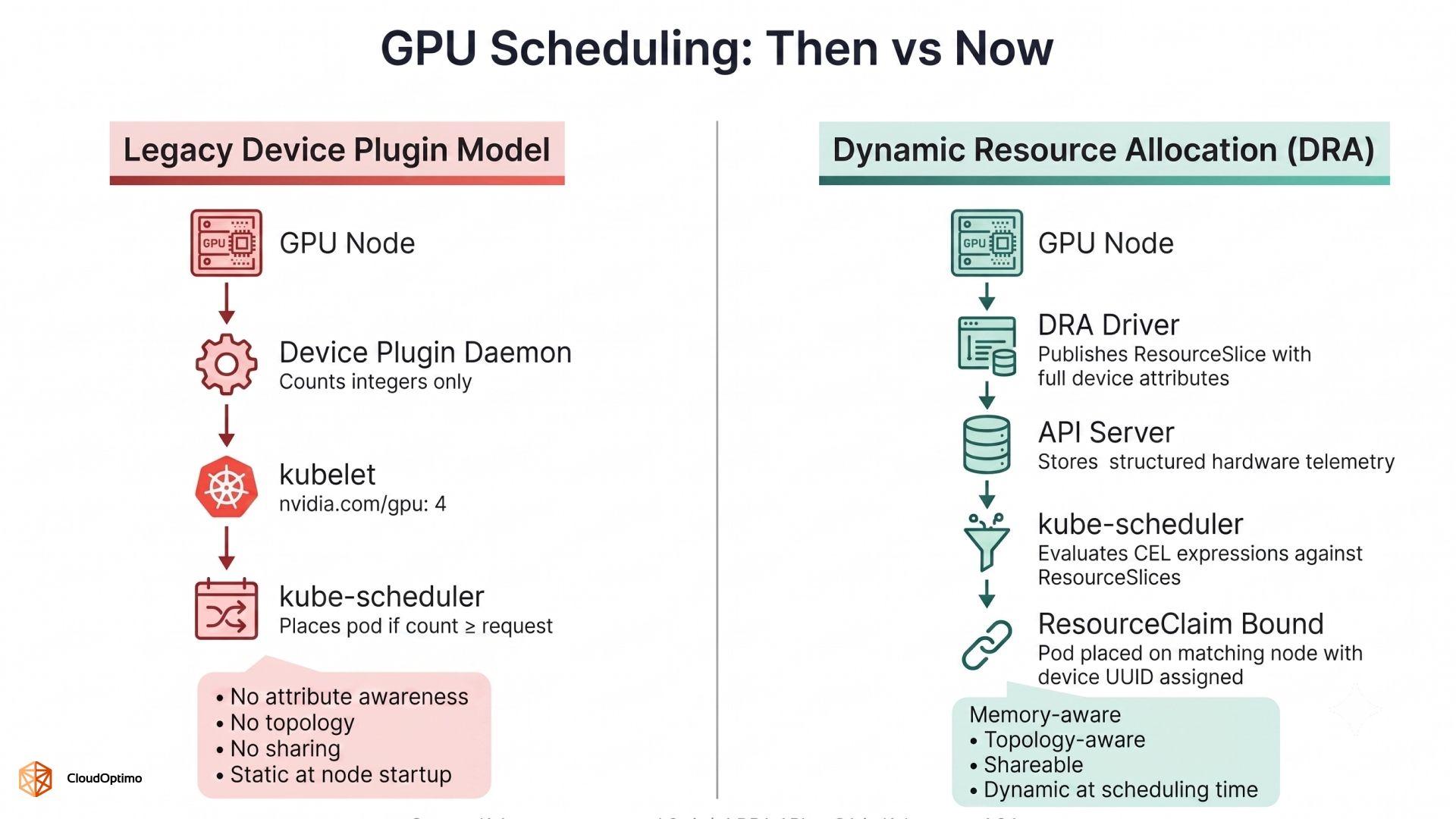 DRA did not arrive as a patch on top of the device plugin model. It was designed from the ground up as a replacement for how Kubernetes thinks about, expresses, and schedules specialized hardware — with GPUs as the primary motivating use case.
The simplest mental model for DRA draws a direct parallel to how Kubernetes already handles storage. If you have worked with PersistentVolumeClaim and StorageClass, you already understand the pattern: a workload declares what it needs, the infrastructure layer fulfills that need from available capacity, and the scheduler binds the two together. DRA applies the same declarative contract to hardware devices. The workload does not need to know which specific GPU it will receive — only what that GPU must be capable of.
The Three Core Primitives
DRA introduces three new API objects under the resource.k8s.io/v1 group, each with a distinct and non-overlapping responsibility.
ResourceSlice — What the hardware actually has
A ResourceSlice is published by the DRA driver running on each node. It is the hardware's declaration to the API server: "here is what I have, and here are its precise attributes." For a GPU node, a ResourceSlice enumerates each device along with its driver name, memory capacity, architecture generation, NVLink connectivity, and any other attributes the vendor driver chooses to expose.
This is the critical architectural shift from the device plugin model. Instead of a kubelet reporting a single integer (nvidia.com/gpu: 4), the cluster now holds rich, structured, queryable hardware telemetry. The scheduler can see not just how many devices exist, but what those devices are actually capable of.
DeviceClass — What category of hardware this represents
A DeviceClass is a cluster-scoped object defined by the cluster administrator or the vendor driver installation. It acts as a named category of hardware with a baseline selector. When NVIDIA's DRA driver is installed, it automatically creates DeviceClasses such as gpu.nvidia.com and mig.nvidia.com. A DeviceClass answers the question: "what driver manages this type of device, and what are the default constraints for requesting it?"
ResourceClaim — What the workload needs
A ResourceClaim is the workload's demand statement. It references a DeviceClass and specifies additional attribute requirements using Common Expression Language (CEL) selectors. The scheduler evaluates these CEL expressions against the available ResourceSlices at scheduling time — not at node startup, not through a separate controller, but inline within the standard scheduling cycle itself.
| yaml # A ResourceClaim requesting a GPU with at least 40Gi of memory. # The CEL expression is evaluated by the scheduler against live ResourceSlice data. apiVersion: resource.k8s.io/v1 kind: ResourceClaim metadata: name: inference-gpu-claim namespace: ml-workloads spec: devices: requests: - name: gpu deviceClassName: gpu.nvidia.com selectors: - cel: expression: > device.capacity['gpu.nvidia.com'].memory.isGreaterThan(quantity('40Gi')) |
A Pod then references this claim in its spec, and the scheduler will only place the Pod on a node where a matching device exists and is available — no nodeSelector, no nodeAffinity, no manual topology encoding required.
Why CEL Changes the Scheduling Model
The shift to CEL as the expression language for device selection is more significant than it might appear. CEL expressions are evaluated by kube-scheduler itself against the structured data in ResourceSlices. Allocation decisions happen entirely within the standard Kubernetes scheduling path — no external controller negotiation, no webhook roundtrips, no secondary scheduler required.
The practical consequence is that DRA scheduling failures are also visible and structured. When a ResourceClaim cannot be satisfied, the reason surfaces directly on the claim object: "no device matches selector" or "insufficient capacity." This is a meaningful operational improvement over the device plugin era, where a pod stuck in Pending due to GPU unavailability required log-diving to diagnose.
Starting with Kubernetes 1.34, the resource.k8s.io/v1 API is stable and enabled by default. No feature gates need to be toggled to use the core DRA API in a 1.34+ cluster. The foundation is in place — but putting it to work for NVIDIA GPUs requires one additional layer: the vendor-supplied DRA driver.
4. Operational Prerequisites: Deploying the NVIDIA DRA Driver
Understanding DRA conceptually and running it in production are separated by a set of decisions that are easy to overlook and expensive to get wrong. This section covers exactly what is required to use DRA with NVIDIA GPUs in a real cluster — version requirements, the conflict you must resolve before installation, and how to confirm the driver is actually working.
Kubernetes Version and the Legacy Plugin Conflict
The minimum requirement is Kubernetes v1.34.2 or newer. This is not a soft recommendation — versions prior to 1.34 expose DRA only as alpha or beta APIs with breaking changes between minor releases. Do not build production deployments on pre-GA DRA surfaces.
The more consequential prerequisite is easy to miss: the legacy NVIDIA device plugin and the DRA driver cannot run simultaneously on the same node. Both compete to own the device allocation path. Running them concurrently causes resource registration conflicts — GPUs may appear double-counted, unschedulable, or invisible to the scheduler depending on the race condition.
The resolution is straightforward but must be done in the right order. Set devicePlugin.enabled=false in the GPU Operator Helm values, drain the affected nodes, and confirm the device plugin daemonset pods are fully terminated before proceeding. Installing the DRA driver while the legacy plugin is still running is the single most common cause of broken DRA installations.
Installing the NVIDIA DRA Driver
NVIDIA ships its DRA driver as a standalone Helm chart, separate from the GPU Operator device plugin. The current production release is v25.12.0.
| bash # Add the NVIDIA Helm repository helm repo add nvidia https://helm.ngc.nvidia.com/nvidia && helm repo update |
| # Install the DRA driver # gpuResourcesEnabledOverride=true is required -- the GPU kubelet plugin # is disabled by default in the chart and must be explicitly activated helm upgrade -i nvidia-dra-driver-gpu nvidia/nvidia-dra-driver-gpu \ --version="25.12.0" \ --create-namespace \ --namespace nvidia-dra-driver-gpu \ --set gpuResourcesEnabledOverride=true \ --set nvidiaDriverRoot=/run/nvidia/driver |
The gpuResourcesEnabledOverride=true flag deserves explicit attention. Omitting it produces a partial installation where ComputeDomain support is active but GPU allocation through ResourceClaims is not — the driver appears healthy, pods deploy without error, but GPU devices are never actually allocated. This silent failure is difficult to diagnose if you do not know the flag exists.
Verifying the Installation: ResourceSlices Are the Signal
Pod health is not sufficient verification. The correct signal is the presence and content of ResourceSlice objects — if the driver is running correctly, it publishes one ResourceSlice per GPU node containing the full device inventory for that node.
| bash # Expect one ResourceSlice per GPU node kubectl get resourceslice # Verify device attributes are fully populated on a specific slice kubectl get resourceslice <resourceslice-name> -o yaml # Confirm DeviceClasses were registered automatically by the driver kubectl get deviceclass |
A healthy installation registers at minimum gpu.nvidia.com and mig.nvidia.com as DeviceClasses. A correctly populated ResourceSlice lists each GPU with its full attribute set: memory capacity, device UUID, driver name, and topology metadata. An absent or empty ResourceSlice means the kubelet plugin is not running — no DRA-based scheduling will succeed regardless of what pod specs request, and no error will surface until a ResourceClaim is created and fails to bind.
With ResourceSlices populated and DeviceClasses registered, the cluster is ready. The next section puts it to work.
5. Writing Your First GPU ResourceClaim and Ensuring Backward Compatibility
 With the driver running and ResourceSlices confirmed, there are two practical questions every team faces at this point: which DRA request pattern fits their workload, and what happens to existing manifests that still use nvidia.com/gpu: 1. This section answers both.
ResourceClaim vs. ResourceClaimTemplate
DRA provides two mechanisms for attaching GPU resources to workloads. The choice between them determines whether pods share a single device or each receive their own — getting this wrong leads to either GPU starvation or unnecessary resource waste.
A ResourceClaim is a standalone object that multiple pods can reference simultaneously. Pods co-locate on the same allocated device. Use this for inference replicas or sidecar containers where sharing is intentional.
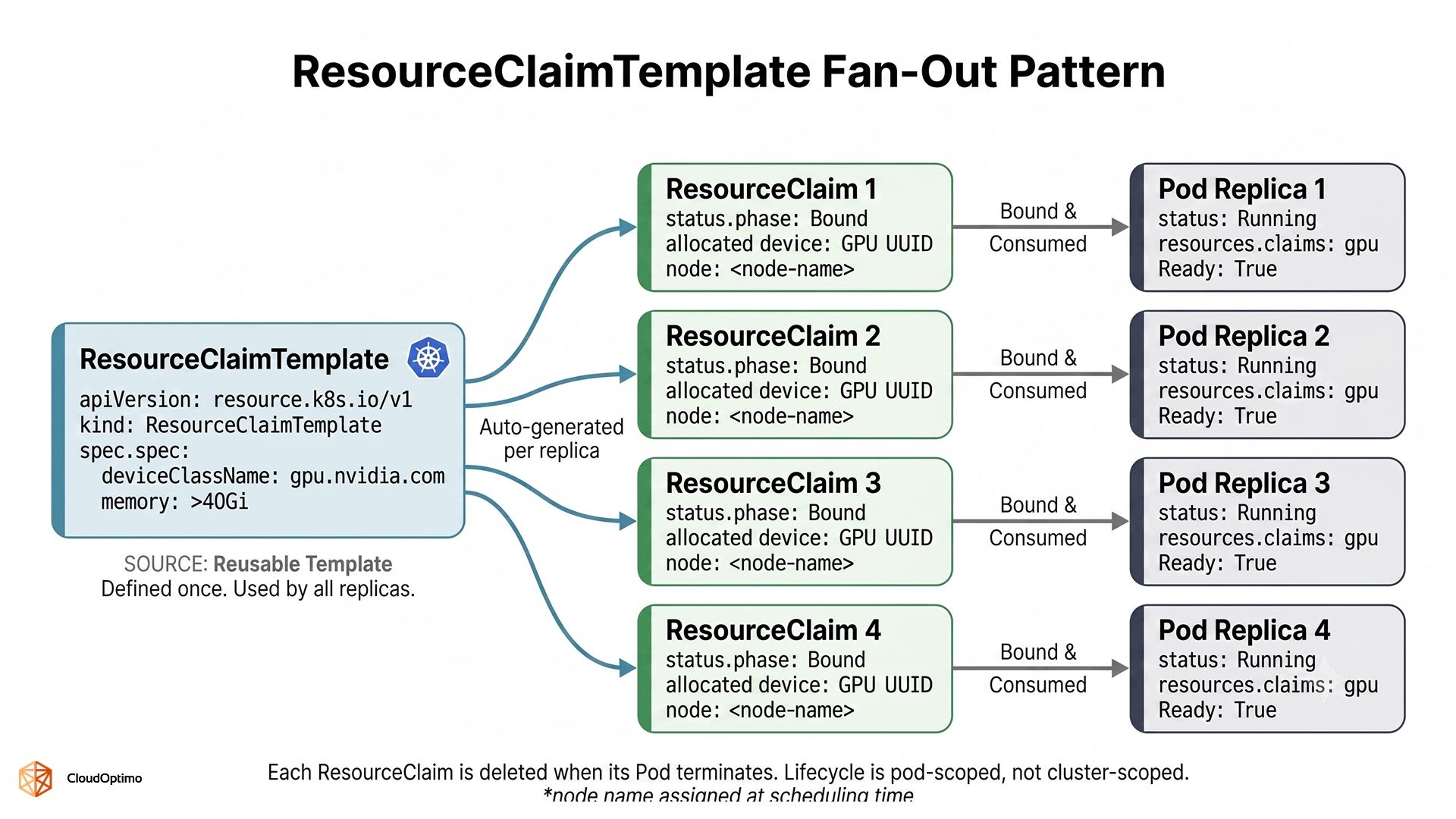
A ResourceClaimTemplate generates a fresh, independent ResourceClaim per pod at scheduling time. Each replica gets its own device. The generated claim is tied to the pod's lifecycle — it is deleted when the pod terminates. Use this for distributed training, where each worker process must have exclusive GPU access.
| Pattern | Device per Pod | Lifecycle | Best Use Case |
| ResourceClaim (shared) | No — pods share one device | Manually managed | Inference replicas, dev containers |
| ResourceClaimTemplate | Yes — one device per pod | Tied to pod lifecycle | Distributed training, batch workers |
A Complete Working Example
The following manifests demonstrate the full chain for a distributed training deployment — a ResourceClaimTemplate requesting a GPU with at least 40Gi of memory, and a four-replica Deployment where each replica receives its own dedicated allocation at scheduling time.
| yaml # ResourceClaimTemplate -- one ResourceClaim is generated per pod replica apiVersion: resource.k8s.io/v1 kind: ResourceClaimTemplate metadata: name: training-gpu-template namespace: ml-workloads spec: spec: devices: requests: - name: gpu deviceClassName: gpu.nvidia.com exactly: allocationMode: ExactCount count: 1 selectors: - cel: expression: > device.capacity['gpu.nvidia.com'].memory.isGreaterThan(quantity('40Gi')) |
| yaml # Deployment -- each of the four replicas gets its own generated ResourceClaim apiVersion: apps/v1 kind: Deployment metadata: name: model-training-job namespace: ml-workloads spec: replicas: 4 selector: matchLabels: app: model-trainer template: metadata: labels: app: model-trainer spec: resourceClaims: - name: gpu resourceClaimTemplateName: training-gpu-template containers: - name: trainer image: pytorch/pytorch:2.3.0-cuda12.1-cudnn8-runtime resources: claims: - name: gpu command: ["python", "train.py"] |
After applying, verify that the scheduler bound each replica to a device:
| bash # Expect one ResourceClaim per replica kubectl get resourceclaims -n ml-workloads |
| # Check allocation status on a specific claim kubectl get resourceclaim <claim-name> -n ml-workloads -o yaml |
A successfully allocated claim shows a populated .status.allocation field containing the node name and device UUID the scheduler selected. If .status.allocation is empty and the pod is Pending, the reason is surfaced directly on the claim object no log-diving required. Common messages are "no device matches selector" (CEL expression too restrictive) or "insufficient allocatable devices" (all matching GPUs are occupied).
Handling Existing Workloads: The DRAExtendedResource Bridge
Teams migrating active clusters have an immediate concern: do manifests using nvidia.com/gpu: 1 break the moment the legacy device plugin is removed? With the right configuration, they do not.
Kubernetes 1.34 ships the DRAExtendedResource feature gate (KEP-5004) specifically for this scenario. When enabled on both kube-apiserver and kube-scheduler, the scheduler intercepts traditional extended resource requests and translates them into ResourceClaims backed by the DRA driver automatically. Existing workloads continue to schedule without any manifest changes.
| bash # Add to --feature-gates on both kube-apiserver and kube-scheduler --feature-gates=DRAExtendedResource=true |
Treat this as a time-boxed migration window. The translation layer adds scheduling overhead and, more importantly, bypasses CEL's full expressiveness — workloads on the bridge cannot benefit from memory-aware or topology-aware placement until they are migrated to native ResourceClaim definitions. A sprint-based migration plan, converting workloads namespace by namespace, is the recommended approach.
6. The Evolution of Sharing: Time-Slicing, MIG, and Consumable Capacity
The three GPU sharing models in Kubernetes solve different problems at different layers of the hardware stack. Using the wrong one for a given workload is one of the more common sources of GPU performance issues in production.
Time-Slicing: Density Without Isolation
Configured at the NVIDIA driver level, time-slicing allows multiple processes to share compute units via hardware context-switching. The DRA driver advertises multiple virtual GPU resources from a single physical device. The density benefit is real, the hard limitation is that there is no memory isolation. All tenants draw from the same VRAM pool. A workload that over-allocates memory does not fail cleanly; it causes OOM errors for co-resident workloads with no scheduler-layer warning. Time-slicing suits development namespaces and interactive notebooks. It should not be used where memory predictability is a service-level concern.
MIG: Hardware-Level Partitioning
Multi-Instance GPU (MIG), available on A100 and H100, partitions a physical GPU at the silicon level. Each instance gets dedicated compute units, L2 cache, and VRAM — isolation enforced in hardware, not software. Under DRA, MIG instances are exposed through the mig.nvidia.com DeviceClass:
| # ResourceClaim requesting a specific MIG profile -- 1 compute unit, 10Gi VRAM apiVersion: resource.k8s.io/v1 kind: ResourceClaim metadata: name: mig-inference-claim namespace: ml-workloads spec: devices: requests: - name: mig-slice deviceClassName: mig.nvidia.com exactly: allocationMode: ExactCount count: 1 selectors: - cel: expression: > device.attributes['gpu.nvidia.com'].profile == "1g.10gb" |
The tradeoff is configuration rigidity — partition profiles must be planned ahead of time based on expected workload mix. MIG is the right choice when workloads from different teams or tenants share a node and memory isolation is a hard requirement.
Consumable Capacity: Native Fractional Accounting
Consumable Capacity (KEP-5075, alpha in Kubernetes 1.34) is the most architecturally significant of the three because it moves fractional GPU accounting entirely into the Kubernetes scheduler — no driver-level workarounds required.
A driver supporting this feature marks a device with AllowMultipleAllocations: true in its ResourceSlice and declares total allocatable capacity with a request policy. The scheduler tracks consumed capacity across all active ResourceClaims, rejecting new claims that would push total consumption over the device's budget — enforced at scheduling time, before the pod lands. Each allocation gets a unique ShareID the driver uses to enforce per-share limits at the CUDA context level.
| # ResourceClaim requesting 10Gi from a device supporting consumable capacity apiVersion: resource.k8s.io/v1 kind: ResourceClaim metadata: name: fractional-inference-claim namespace: ml-workloads spec: devices: requests: - name: gpu exactly: allocationMode: ExactCount count: 1 deviceClassName: gpu.nvidia.com selectors: - cel: expression: > device.capacity['gpu.nvidia.com'].memory.isGreaterThan(quantity('40Gi')) && device.allowMultipleAllocations == true capacity: requests: memory: "10Gi" |
Note: DRAConsumableCapacity is an alpha feature gate requiring explicit enablement on kubelet, kube-apiserver, kube-scheduler, and kube-controller-manager not suitable for production without thorough testing.
Choosing the Right Model
| Dimension | Time-Slicing | MIG | Consumable Capacity (DRA) |
| Memory isolation | None | Full (hardware) | Enforced by scheduler |
| Compute isolation | None | Full (hardware) | Partial (driver-enforced) |
| Scheduler awareness | No | Yes (via DRA) | Yes (native) |
| Cross-namespace sharing | Yes | Yes | Yes |
| Runtime reconfiguration | Not required | Requires profile change | Dynamic |
| Maturity (Kubernetes 1.34) | Stable | Stable (DRA-managed) | Alpha |
| Best for | Dev/notebook environments | Multi-tenant inference | Mixed inference workloads |
The three models are not mutually exclusive. A production cluster will typically run MIG on dedicated inference nodes, full GPU allocation via ResourceClaim on training nodes, and time-slicing in development namespaces where cost outweighs performance predictability.
Part 2 of this blog will pick up where the scheduler leaves off covering topology-aware placement for multi-node NVLink workloads, the autoscaling reality for DRA clusters, device health tainting, and how these pieces compose into a production-grade AI infrastructure layer.

