
Docker is one of those technologies almost every developer hears about early in their career. People say it makes deployments easier, keeps applications consistent, and works perfectly with Kubernetes. Yet many beginners still finish their first Docker tutorial wondering what a container actually is.
A container does not run its own operating system. It runs on the same operating system as everything else on that machine, just kept separate from it. That single detail explains almost everything else about Docker once it actually clicks, and the rest of this article builds outward from that one idea, from the basics through to where a tool like Kubernetes eventually comes in.
The Problem Docker Was Built to Solve
Before Docker became common, moving an application from one machine to another was a genuine headache. Code written on a laptop with one version of a language installed would often break on a server running a different version. A library that worked fine locally would be missing on the server, or present in a different version that behaved differently. A system package someone installed manually two years ago, and everyone forgot about, would turn out to be the one thing the whole application quietly depended on.
Every engineer has heard some version of it works on my machine. That sentence exists because the application and the machine running it were never fully separated. The code depended on dozens of small details about that one specific machine: its exact software versions, its file paths, its installed tools, none of which travelled with the code itself.
Docker packages an application together with everything it needs to run: the code, the libraries, the exact dependency versions, the configuration, all bundled into one unit called an image. That unit behaves the same way on a laptop, a test server, and a production server, because it carries its own dependencies with it instead of depending on whatever happens to already be installed on the host machine.
What Is a Container, Really?
This is where most of the confusion starts. A container is not a small computer. It is an isolated process running on a machine, using the same operating system kernel as everything else running on that same machine.
Think of a large building with many separate rooms. Each room has its own furniture and its own locked door, so nobody in one room can see what is happening in another. But the electricity, plumbing, and foundation of the building are shared by every room. A container works the same way. It gets its own isolated space for files, processes, and network settings, but it shares the host machine's kernel, the core part of the operating system that actually talks to the hardware.
This sharing is exactly why containers are light. A container does not boot an operating system, because it is not carrying one. It just starts the application directly, using the kernel that is already running on the host.
Docker vs Virtual Machine
A virtual machine works differently. A VM simulates an entire computer, including its own operating system kernel, built from scratch. Starting a VM means booting a full operating system: loading the kernel, starting background services, and only after that starting the actual application. This is why a virtual machine can take a minute or longer just to become usable.
A container skips almost all of that. Since it shares the host's kernel and never boots its own operating system, starting a container is closer to starting a regular program than starting a whole computer. That is the real, technical reason containers start in seconds while virtual machines take much longer. It is not just a marketing line.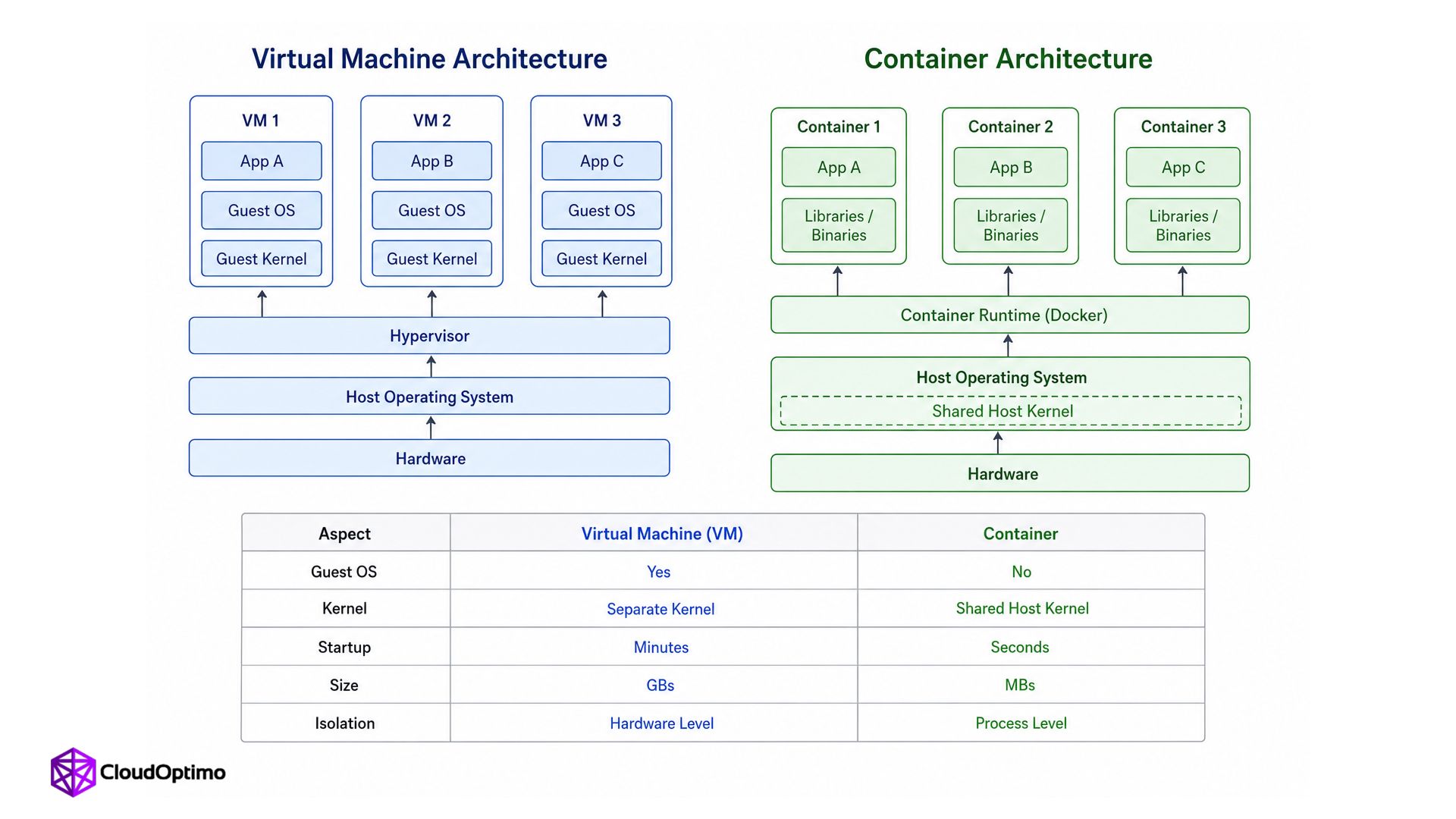
| Aspect | Virtual Machine | Container |
|---|---|---|
| Operating system | Runs its own full OS and kernel | Shares the host machine's kernel, no OS of its own |
| Startup time | Around a minute or more, boots a full OS | Usually a few seconds, starts like a program |
| Typical size | Several gigabytes | Commonly tens to a few hundred megabytes |
| Isolation | Strong, hardware level separation | Lighter, process level separation |
What Is a Docker Image?
An image is the blueprint. It is a read-only package containing the application code, the libraries it depends on, and instructions for how to run it. An image on its own does nothing. It just sits in storage, the way a recipe sits in a cookbook until someone actually cooks from it.
A container is what happens when that image actually runs. The same image can start many containers at the same time, each one an independent running copy, the same way one recipe can be cooked many times, and every plate that comes out is separate even though they all came from the same recipe.
How an Image Actually Gets Built
Every image starts from a file called a Dockerfile. It is a plain text file that lists, step by step, what should go into the image: which base image to start from, which files to copy in, which commands to run to install anything the application needs, and what should happen automatically when a container starts from it.
Nobody builds an image by hand, piece by piece. Docker reads the Dockerfile from top to bottom and builds the image automatically, one instruction at a time. This is the actual mechanism behind the image blueprint described above. The Dockerfile is the recipe, and the image is what comes out once Docker follows that recipe exactly.
Why a Container's Data Disappears by Default
Containers are meant to be disposable. A container can be stopped, deleted, and replaced with a fresh one built from the same image at any time, and this is treated as completely normal, not an emergency.
This creates a real problem the first time someone runs into it. Anything written inside a container's own filesystem while it runs, a log file, an uploaded file, data saved by a database, disappears the moment that container is removed. The next container started from the same image begins with a completely clean filesystem, as if nothing ever happened.
Docker solves this with something called a volume: a piece of storage that lives outside the container itself, on the host machine or somewhere else entirely. A container can be connected to a volume so that specific data survives even after the container that wrote it is gone. Anything not deliberately placed in a volume should be treated as temporary, no matter how permanent it looks while the container is running.
How Multiple Containers Talk to Each Other
A real application is rarely just one container. A typical setup might have one container running the application code and a separate container running its database, and the two need to communicate with each other constantly.
By default, containers are isolated from each other, the same way they are isolated from the host. Docker solves this by creating virtual networks that containers can be connected to. Once two containers share the same network, they can reach each other using simple names instead of needing to know exact addresses. The application container can talk to something called database, for instance, and Docker quietly handles the actual connection underneath. This is what makes it possible for containers built completely independently to work together as one system.
Running More Than One Container Together
Starting one container is simple enough on its own. Starting an application container, a database container, and a caching container together, in the right order, connected to the right network, every single time, becomes tedious fast if it has to be done manually.
This is the problem a tool called Docker Compose solves. Instead of starting each container separately, Compose lets the whole setup, every container, its image, its network, its volumes, be described in a single file. Running that one file starts everything together in one step, exactly the same way every time. Most real projects that use more than one container end up using Compose, or something built on the same idea, rather than starting each piece by hand.
Why Rebuilding an Image Is Fast
Docker builds an image one instruction at a time, and it keeps every one of those steps as a separate layer, stacked on top of each other. This detail matters more than it sounds like it should.
If only the last few lines of a Dockerfile change, for instance a small update to the application code, Docker does not rebuild the entire image from scratch. It reuses every layer that has not changed and only rebuilds the ones that have. This is why rebuilding an image after a small code change usually takes a few seconds, while the first build of a new project can take a lot longer. This caching happens automatically, without anyone having to think about it, as long as the Dockerfile is written with this behaviour in mind.
Why Smaller Images Matter in Production
Not every base image is the same size, and the difference is larger than it might seem. A full operating system image can be several hundred megabytes before a single line of application code is even added. A minimal image built specifically for this purpose, alpine is the most common example, can be a fraction of that size.
Smaller images download faster, start faster, and take up less space wherever they are stored. They also carry fewer unnecessary tools and libraries inside them, which means less that could ever go wrong or be exploited if something inside the container is ever compromised. This is why production teams often care about image size specifically, not only whether the application inside it works.
The Real Limitation of Containers
Docker images are often named after operating systems: ubuntu, alpine, debian. This naming is the direct reason so many beginners assume a container includes a full operating system inside it.
It does not. An image named ubuntu only contains the user space files that make Ubuntu feel like Ubuntu: its package manager, its standard folder layout, its common tools. It does not contain the Linux kernel itself. The kernel always belongs to the host machine, whatever machine the container happens to be running on.
This points to a genuine limitation, not just a beginner mix-up. Since every container on a machine shares that same host kernel, containers cannot offer the same strength of isolation a virtual machine gives. A Linux container needs a Linux kernel underneath it to run at all, and if that shared kernel ever has a serious problem, every container relying on it is affected together. This is the honest tradeoff for the speed containers offer.
It also explains something most people using Docker for years never notice. Windows and Mac computers do not run a Linux kernel by default, so Docker Desktop quietly runs a small hidden Linux virtual machine in the background, just to give Linux containers a Linux kernel to borrow from. The container still starts fast and feels native, but underneath it, there is a small VM doing the one job containers themselves are built to avoid needing.
Where Docker Fits Next to Kubernetes
Docker is built to run one container on one machine well. Real production systems rarely stop at one container on one machine. They run dozens, sometimes thousands, of containers spread across many machines, and something has to decide which container runs where, restart the ones that crash, and route traffic to the right place.
That coordination job belongs to Kubernetes. Kubernetes does not replace what Docker does. Docker's job is packaging and running an application as a container. Kubernetes' job is managing many of those containers across many machines at once, which is a different problem from anything covered so far, and the reason Kubernetes exists as a separate tool rather than being part of Docker itself.
One detail worth knowing: modern Kubernetes clusters generally do not run Docker Engine directly anymore. Since Kubernetes version 1.24, released in 2022, the project moved to running containers through other tools, most commonly containerd, because it does the same underlying job with less overhead. Docker images still work exactly the same way inside Kubernetes. Only the internal engine actually running them changed.
The Idea That Actually Matters
Specific commands and tool names can always be looked up later. What is worth genuinely understanding is the idea underneath all of it: a container is not a small computer, it is an isolated process borrowing the host machine's kernel, and an image is the frozen blueprint that container gets built from.
Once that single idea is clear, everything else starts making sense on its own instead of feeling like a pile of separate facts to memorise: why containers start in seconds, why data needs a volume to survive, why multiple containers need a shared network to talk to each other, why rebuilding an image after a small change is fast, and why a tool like Kubernetes exists at all once one container on one machine is no longer enough.

