
Ask five engineers whether to build on Kubernetes or go serverless, and you'll usually get five different answers, each defended with a war story. That's because this isn't really a technology debate. It's an operating model debate. Kubernetes and serverless represent two very different answers to the same question: how much infrastructure do you want to own, and how much control are you willing to trade away to stop owning it?
Neither one is the "modern" choice and the other the "legacy" one, despite what conference talks sometimes imply. Both are actively used at massive scale in production today, often by the same companies, for different parts of the same system. This article walks through what each model actually does under the hood, where the real trade-offs sit, and how to decide which one fits the workload in front of you instead of the one that was trending on Hacker News last month.
The Core Difference: Who Manages What?
Kubernetes gives you a container orchestration platform. You define what you want to run, and Kubernetes schedules it onto a cluster of nodes, keeps it running, restarts it if it fails, and scales it based on rules you configure. You are still responsible for the cluster itself: node capacity, upgrades, networking, and a meaningful chunk of operational overhead, unless you're using a managed variant.
Serverless (in the specific sense of Functions-as-a-Service platforms like AWS Lambda, Azure Functions, and Google Cloud Functions) removes the cluster from your job description entirely. You write a function, deploy it, and the platform handles provisioning, scaling, and teardown of the underlying compute automatically. You don't choose an instance type. You don't patch an OS. You don't even know, most of the time, what machine your code actually ran on.
The distinction that matters most in practice isn't "containers vs functions." It's this: Kubernetes gives you a persistent, addressable compute layer you control the shape of. Serverless gives you an ephemeral, event-triggered compute layer someone else controls the shape of. Everything else in this comparison, cost, scaling behavior, cold starts, operational burden, flows from that one architectural choice.
A Quick Comparison
| Aspect | Kubernetes | Serverless (FaaS) |
| Unit of deployment | Container / Pod | Function |
| Infrastructure management | You manage nodes (or a managed control plane) | Fully abstracted by the provider |
| Scaling model | Configured via HPA/VPA, reacts on your rules | Automatic, per-invocation, provider-managed |
| Billing model | Pay for provisioned capacity (running nodes) | Pay per invocation and execution time |
| Cold start | Rare, mostly at node/pod scheduling | Common, especially on infrequent invocations |
| Execution duration limits | None, long-running processes are normal | Capped (AWS Lambda's hard limit is 900 seconds) |
| State | Can run stateful workloads with persistent volumes | Designed to be stateless between invocations |
| Vendor lock-in risk | Lower, portable across clouds | Higher, tied to provider-specific triggers and APIs |
| Operational overhead | Higher, someone owns the cluster | Lower, provider owns the infrastructure |
| Best fit | Complex, long-running, multi-service systems | Event-driven, sporadic, bursty workloads |
Why This Distinction Actually Matters
It's tempting to frame this as "serverless is easier, Kubernetes is more powerful," and stop there. That framing is incomplete, because it hides the two factors that actually decide whether a workload belongs on one or the other: execution shape and control requirements.
Execution shape. Serverless platforms are fundamentally built around short-lived, stateless, event-triggered execution. A function spins up, does one unit of work, returns a response, and shuts down. This maps beautifully onto workloads like image resizing on upload, processing a queue message, or responding to a webhook. It maps poorly onto workloads that need to hold state in memory across requests or run background processes indefinitely, since AWS Lambda's hard execution ceiling of 15 minutes forces you to redesign anything that naturally runs longer than that. WebSockets are a partial exception: API Gateway's WebSocket API maintains the persistent connection itself and routes individual messages to short-lived Lambda invocations, which is a real, widely used production pattern, just not the same model as a function holding a connection open on its own.
Control requirements. Kubernetes gives you control over nearly everything: node types, networking policies, custom schedulers, sidecar patterns, GPU allocation, exact resource guarantees. That control is exactly what teams running complex, multi-service systems with strict latency or compliance requirements need. It's also exactly what teams building a simple event handler don't need and shouldn't pay the operational cost for. Choosing Kubernetes for a workload that's really just "run this function when an S3 object lands" is a common overengineering mistake, and choosing serverless for a workload that needs persistent in-memory state or sub-50-millisecond consistent latency is an equally common underengineering mistake.
How Each One Actually Works
Kubernetes
A Kubernetes cluster consists of a control plane (the API server, scheduler, controller manager, and etcd for state storage) and worker nodes that actually run your containers. When you submit a deployment manifest, the scheduler decides which node has capacity to run your pod, based on resource requests and constraints you define. The kubelet on that node then tells the container runtime (containerd, in most modern clusters) to pull the image and start the container.
From there, Kubernetes continuously reconciles the actual state of the cluster against the desired state you declared. If a pod crashes, the controller notices the mismatch and starts a replacement. If you've configured a Horizontal Pod Autoscaler, it watches metrics like CPU or custom application metrics and adjusts the number of pod replicas accordingly. None of this happens instantly. Scaling out means scheduling new pods, which in most cases run on nodes that are already provisioned and warm, making pod-level scaling reasonably fast, typically single-digit seconds. Scaling out when you also need new nodes (cluster autoscaling) is slower, commonly 1 to 3 minutes with standard managed node groups, faster with just-in-time provisioners like Karpenter, and slower still, sometimes 5 minutes or more, when spot capacity or a cold AMI pull is involved.
Serverless
A FaaS platform works differently. Your function code sits dormant, uploaded but not running, until an event triggers it: an HTTP request, a message landing in a queue, a file uploaded to object storage, a scheduled cron event. When that trigger fires, the platform allocates an execution environment, loads your code and dependencies, initializes the runtime, and runs your handler.
That initialization step is the source of the cold start problem serverless is known for. If your function hasn't run recently, building a fresh execution environment on AWS Lambda typically adds anywhere from around 100 milliseconds to a few seconds, with heavier runtimes like Java generally seeing the largest impact. Warm invocations avoid this initialization overhead and begin executing immediately, which is why steady traffic usually experiences more consistent latency than sporadic traffic. AWS Lambda SnapStart, available for Java and later introduced for additional runtimes including Python and .NET, further reduces cold start latency by restoring a pre-initialized execution environment from a snapshot instead of performing a full initialization, often reducing Java cold starts from multiple seconds to well under a second.
Provisioned Concurrency on AWS Lambda (and equivalent features elsewhere) works around this by keeping a set number of environments warm at all times, at the cost of paying for that idle capacity, which somewhat undercuts the pure pay-per-use appeal that draws teams to serverless in the first place.
Kubernetes vs Serverless: Execution and Scaling Model Compared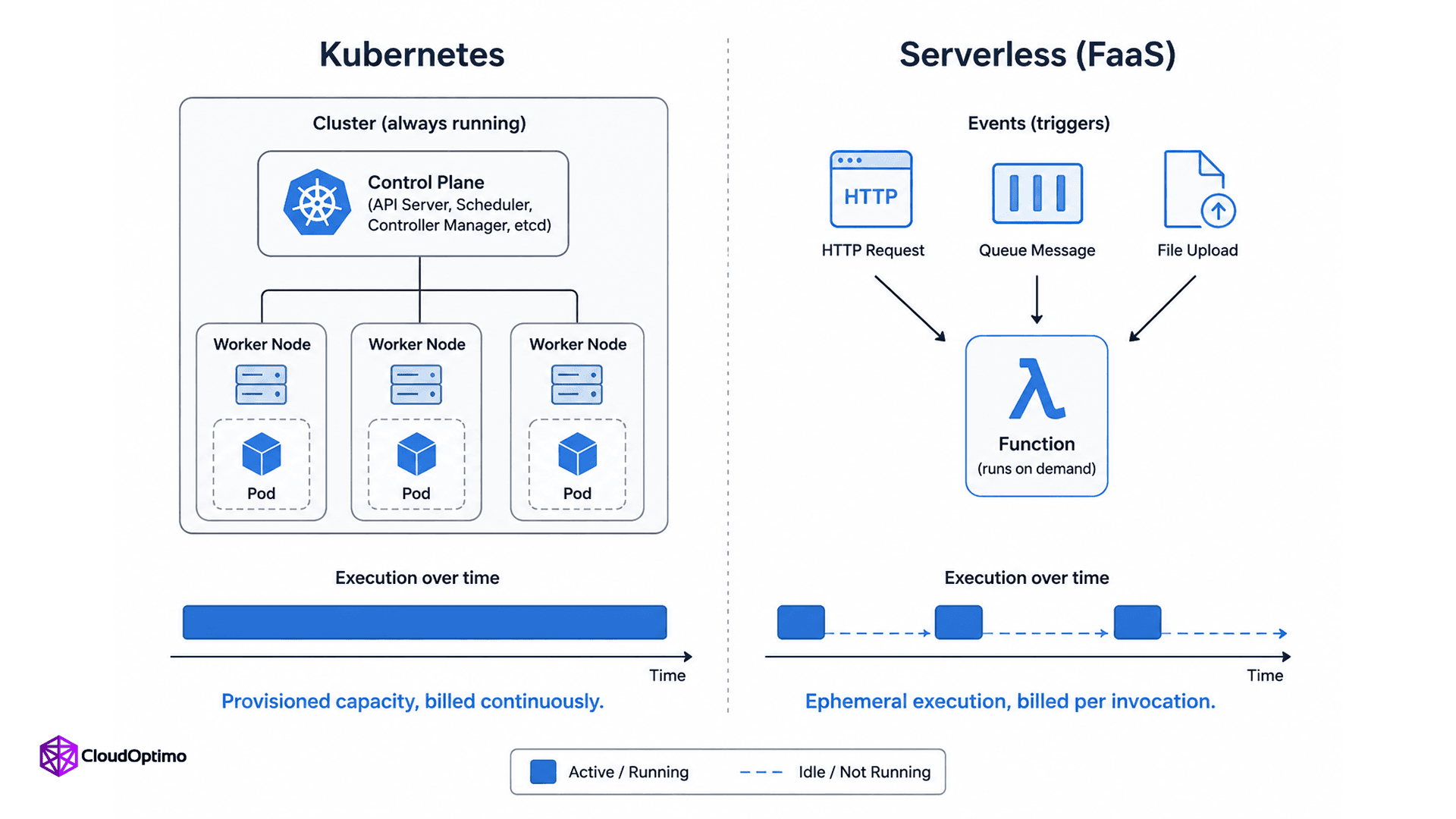
Figure: Kubernetes runs on continuously provisioned, always-on capacity you manage, while serverless spins up ephemeral execution environments only in response to events, billed per invocation and execution duration rather than continuously provisioned capacity.
Performance and Cost Behavior
The cost models are structured so differently that comparing Kubernetes vs AWS Lambda on a single workload usually requires running the numbers rather than trusting intuition.
Kubernetes bills you for provisioned capacity. If your nodes are sized for peak load, you're paying for that capacity around the clock, whether traffic is high or near zero at 3 a.m. This is inefficient for spiky workloads and efficient for steady, high-throughput ones, where the fixed cost amortizes across a large, consistent request volume. A cluster running at 60 to 80 percent average utilization is usually the target range teams aim for, since much lower wastes capacity and much higher risks no headroom for spikes.
Serverless bills per invocation and execution duration, typically measured in GB-seconds. This is efficient for low or irregular traffic, since you pay close to nothing when nothing is happening. It gets noticeably more expensive than a comparable Kubernetes deployment once traffic is sustained and high, because every request carries its own billing premium instead of sharing a fixed infrastructure cost. A serverless architecture that looked cheap in a proof of concept can quietly cost more than a containerized equivalent once real production traffic arrives; the crossover point depends on invocation volume, memory allocation, and average execution time, so it's worth modeling rather than assuming.
Security Considerations
Both models shrink your security responsibilities compared to running your own VMs, but they shrink different parts of it.
Serverless removes OS-level patching, container runtime hardening, and node-level security entirely from your plate, since the provider owns that layer completely. What remains your responsibility is function-level: least-privilege IAM roles per function, dependency vulnerability management, input validation, and secrets handling. A dangerously common mistake is granting a Lambda function broad IAM permissions "to save time," which turns what should be a narrowly scoped event handler into a much larger blast radius if that function's code or a dependency is ever compromised.
Kubernetes gives you more surface to secure, and more tools to secure it with. Network policies, pod security standards, RBAC, admission controllers, and image scanning are all things a Kubernetes-based system needs someone actively maintaining, not just configuring once. The operational tradeoff is real: Kubernetes security is more work, but it's also more precise, letting you enforce controls at a granularity serverless platforms simply don't expose.
When to Use Kubernetes
- Long-running, stateful, or persistent-connection workloads such as databases, message brokers, or WebSocket-based real-time services that don't fit a short-lived execution model.
- Complex multi-service architectures where you need fine-grained control over networking, service discovery, and resource allocation across many interdependent components.
- Steady, high-throughput traffic where provisioned capacity is cheaper than per-invocation billing over time.
- Multi-cloud or portability requirements, Kubernetes workload definitions travel across providers far more easily than serverless triggers and APIs do, but treat this as a relative advantage, not a free lunch: storage classes, load balancer integrations, CNI plugins, and IAM patterns (IRSA on EKS, Workload Identity on GKE) all differ enough between managed Kubernetes offerings that migrating a production cluster across clouds is still real engineering work.
- GPU or specialized hardware workloads, such as ML training or inference, where you need direct control over hardware allocation that serverless platforms don't expose in the same way.
When to Use Serverless
- Event-driven, sporadic workloads like processing uploaded files, responding to webhooks, or handling queue messages, where traffic is unpredictable and often low-volume.
- Rapid prototyping and MVPs, where you want to ship functionality without standing up and maintaining cluster infrastructure.
- Workloads with genuinely idle periods, where paying nothing when there's no traffic is a real financial advantage over a cluster billing 24/7.
- Small, focused teams without dedicated platform or SRE capacity, where the operational simplicity of offloading infrastructure management outweighs the loss of control.
- Scheduled or batch jobs under the execution time ceiling, such as periodic data transformations or cleanup tasks that comfortably finish within the platform's duration limits.
The Real-World Answer: Most Systems Use Both
Framing this as a single, system-wide decision misses how most production architectures actually look. A common, genuinely sensible pattern runs the core, steady-state application on Kubernetes, where predictable traffic makes provisioned capacity the economical choice, while handling event-driven edges, image processing, webhook handlers, scheduled cleanup jobs, on serverless, where sporadic traffic makes per-invocation billing the better fit. This isn't a compromise; it's the same principle running through the whole comparison, match the model to the workload's traffic shape and state requirements instead of forcing every workload onto one platform. Teams that standardize on a single choice usually end up overpaying for serverless on high-throughput services or over-operating Kubernetes for something that was really just a cron job.
There's also a growing middle ground worth knowing about. Knative brings a serverless-style, scale-to-zero model on top of Kubernetes itself, KEDA (a CNCF Graduated project since 2023) adds event-driven autoscaling to Kubernetes using the same trigger model FaaS platforms use, and managed platforms like AWS Fargate or Google Cloud Run run containers without managing nodes at all. The containers vs serverless line is blurring on purpose here. Fargate is worth pricing out first, though: it typically charges a meaningful premium per vCPU-hour over comparable EC2-backed nodes as the cost of not managing them yourself.
Common Misconceptions Worth Correcting
"Serverless means no servers." There are servers. The provider just manages them, so you never provision or see them.
"Kubernetes is always more expensive than serverless." Only at low, sporadic traffic. At sustained high throughput, provisioned Kubernetes capacity is often cheaper than a per-invocation premium on every request.
"Serverless can't handle real production workloads." Plenty of large-scale systems run core logic on Lambda. The real limit isn't scale, it's shape: long-running, stateful, or latency-sensitive work fits poorly regardless of volume.
"You have to choose one platform for your entire system." Most mature serverless architecture decisions mix both, matching each workload to the model that fits its traffic pattern and state needs.
Quick Decision Matrix
When the trade-offs above feel abstract, these practical guidelines cover most common workload decisions.
- Traffic is steady and high-volume : Kubernetes (provisioned capacity is usually more cost-effective)
- Traffic is sporadic or unpredictable : Serverless (pay-per-use wins on cost)
- Workload needs to hold state or long-lived connections : Kubernetes
- Workload is a short, stateless event handler : Serverless
- You need predictable, consistently low latency on every request : Kubernetes (avoids cold starts)
- You have no dedicated platform or SRE team : Serverless
- You need multi-cloud portability : Kubernetes
- You're prototyping and want to ship fast without infrastructure : Serverless
Observability: Monitoring Kubernetes vs Serverless
Watching a system behave in production looks different on each platform, and it's worth knowing before you commit.
Kubernetes observability is mature and standardized. Prometheus scrapes metrics from pods and nodes, Grafana visualizes them, and tools like OpenTelemetry handle distributed tracing across services. You get deep visibility: per-pod resource usage, node-level metrics, and full control over what you instrument, but you're also responsible for running and maintaining that observability stack alongside the application itself.
Serverless observability is provider-managed by default. AWS Lambda ships invocation counts, duration, and error rates to CloudWatch automatically, with no agents to install. The trade-off is granularity and continuity: you can't SSH into a running function to debug live, cold starts and short execution windows make traditional profiling harder, and distributed tracing across many small functions (via AWS X-Ray or similar) takes deliberate setup to avoid a fragmented, hard-to-follow request path across dozens of functions.
Key Takeaways
- Kubernetes charges for provisioned capacity; serverless charges per invocation. The crossover point is traffic volume, not preference.
- Cold starts make serverless a poor fit for consistent, low-latency requests unless you pay for Provisioned Concurrency.
- Kubernetes gives finer security and networking control; serverless shrinks your responsibility to the function and its permissions.
- Knative, Fargate, and Cloud Run exist specifically to blur this line, offering container flexibility without full cluster ownership.
- Most production systems use both, matched to each workload's traffic shape rather than a single company-wide standard.
Where This Is Heading
The gap between these two models keeps narrowing on purpose. Knative, Google Cloud Run, and AWS Fargate all exist to give teams container-level control without full cluster ownership, and that middle ground is where a growing share of new workloads are landing rather than at either extreme.
Kubernetes is also becoming an increasingly common platform for AI and machine learning workloads across cloud and edge environments. As organizations continue adopting cloud-native infrastructure, Kubernetes is increasingly used to orchestrate training, inference, and other data-intensive workloads, while serverless platforms continue to evolve for event-driven applications.
For engineers making this decision today, the important skill is understanding a workload's traffic patterns, state requirements, and latency constraints well enough to choose the execution model that fits best. In practice, many successful architectures use both.
Frequently Asked Questions (FAQs)
Q1: Is Kubernetes better than serverless?
Neither is universally better; they fit different traffic patterns. Kubernetes is usually the better economic and technical choice for steady, high-throughput, long-running, or stateful workloads, since provisioned capacity gets cheaper per request as volume grows. Serverless is usually better for sporadic, event-driven workloads with unpredictable or low traffic, since you pay only when code actually runs. Most mature production systems use both, running core services on Kubernetes and event-driven edges on serverless.
Q2: Can Kubernetes and serverless work together?
Yes, and this is increasingly common in production architectures. Platforms like Knative bring serverless-style, scale-to-zero execution on top of Kubernetes itself, letting the same cluster host both always-on services and event-triggered workloads. Many teams also run their core application on Kubernetes while handling specific event-driven tasks, like file processing or webhook handling, on a separate FaaS platform such as AWS Lambda, choosing the execution model per workload rather than system-wide.
Q3: Why is serverless considered cheaper than Kubernetes?
Serverless is cheaper at low or irregular traffic volumes because you pay per invocation and execution time rather than for continuously running infrastructure. At high, sustained traffic, this reverses: a per-invocation billing model applies a cost to every single request, while a Kubernetes cluster's provisioned capacity gets amortized across a much larger request volume, often making it the cheaper option once traffic is steady and high enough.
Q4: What causes cold starts in serverless computing, and can they be avoided?
A cold start occurs when a serverless platform has to create a new execution environment because no warm instance is available. This involves allocating compute resources, loading your code and dependencies, initializing the runtime, and starting your handler. Depending on the runtime, deployment package, and initialization work, this can add anywhere from around 100 milliseconds to several seconds of latency. Cold starts can be reduced by keeping deployment packages small, minimizing initialization work, choosing lighter runtimes, using AWS Lambda SnapStart where supported, or enabling Provisioned Concurrency to keep execution environments warm.
Q5: Does serverless mean there are no servers involved?
No. Serverless means the cloud provider manages the servers on your behalf, including provisioning, scaling, and patching, so you never interact with them directly. Servers are still running your code behind the scenes; the term describes the developer's experience of not having to manage infrastructure, not the literal absence of physical or virtual machines.

