
How a pod actually proves its identity to AWS without a static credential anywhere, the trust policy mistake that quietly grants cluster-wide access, and why the newer, simpler replacement still cannot fully retire the older one.
A pod needs to read from an S3 bucket. The easy way is to bake an AWS access key into an environment variable or a Secret and move on. The problem shows up later: that key does not expire, it is not scoped to just that one pod, and if it ever leaks, whoever has it can use it from anywhere, indefinitely, with no connection to the cluster at all.
Kubernetes workload identity solves this without a static credential existing anywhere. A pod proves who it is using a short-lived, cryptographically signed token, and the cloud provider hands back temporary credentials only after verifying that token against a trust relationship configured in advance. Understanding exactly how that verification works, and where it can be misconfigured, matters more than knowing the feature exists.
How IRSA Actually Verifies a Pod's Identity
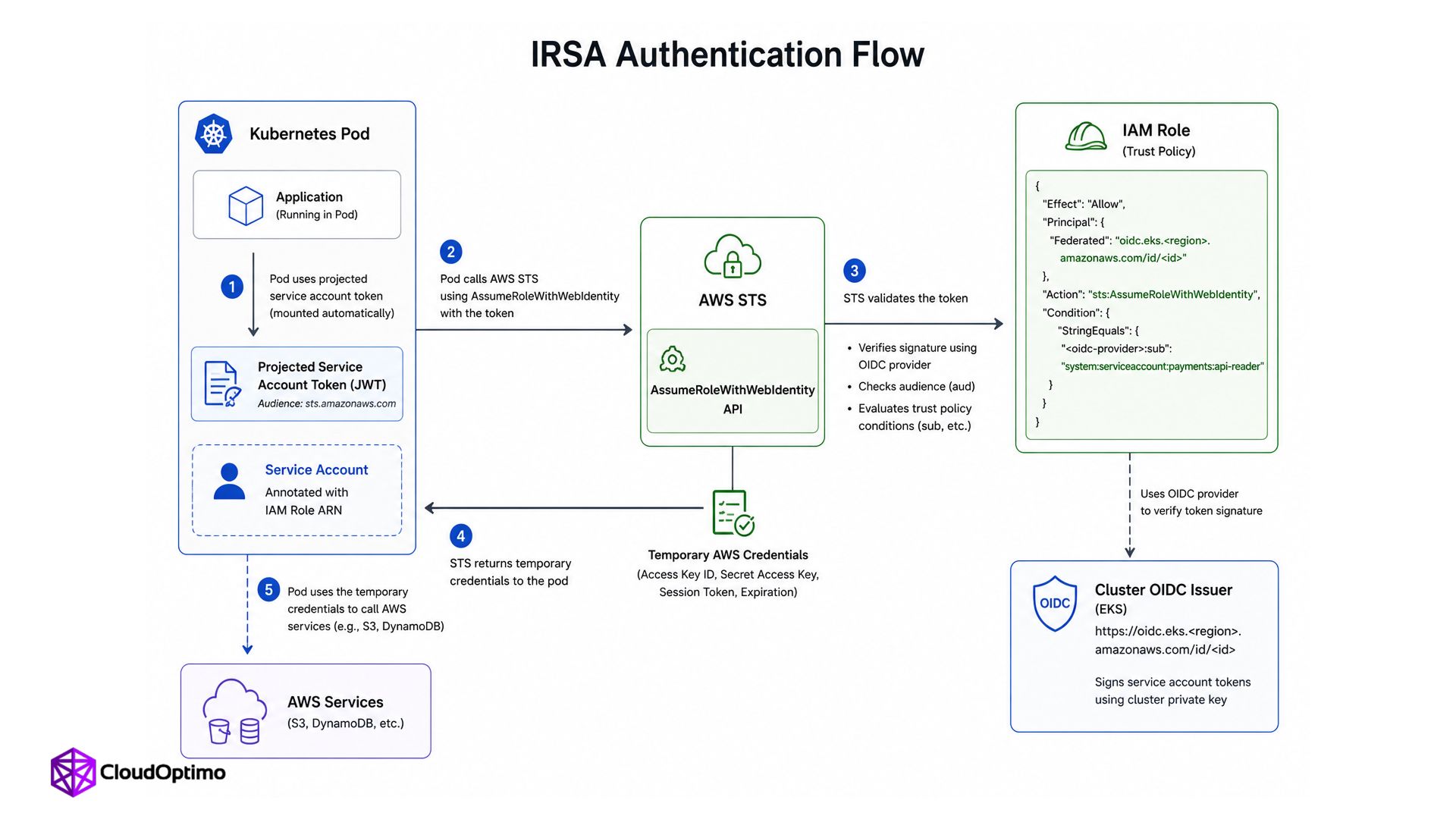
IAM Roles for Service Accounts, or IRSA, was AWS's original way of solving workload identity for EKS. Every EKS cluster has its own OpenID Connect, OIDC, issuer endpoint, and for IRSA that issuer is registered with IAM as an OIDC identity provider. When a pod uses a service account that is annotated with an IAM role, EKS injects a projected service account token into the pod along with the environment variables the AWS SDK needs. That token is short-lived, and its audience is sts.amazonaws.com.
When the application needs to call AWS, the AWS SDK takes that token and sends it to STS using AssumeRoleWithWebIdentity. STS verifies the token using the public signing keys exposed by the cluster's OIDC issuer, then checks claims such as sub and aud against the IAM role's trust policy. If everything matches, STS returns temporary AWS credentials. There is no long-lived AWS access key sitting inside the pod.
The Trust Policy Mistake That Grants More Access Than Intended
The security of this entire mechanism lives in one place: the condition block inside the IAM role's trust policy. A properly scoped IRSA trust policy should check both aud and sub. The aud claim should normally be sts.amazonaws.com, while sub should point to the exact Kubernetes namespace and service account that is allowed to use the role, for example system:serviceaccount:payments:api-reader.
Leave that condition out, or write it loosely, and the trust policy still works, just far more broadly than intended. According to AWS's own documentation, without a sub condition restricting the role to a specific service account, any service account in the entire cluster can assume it. The role still requires a valid token from the correct cluster's OIDC provider, so it is not open to the entire internet, but inside that one cluster, the intended boundary between one application's permissions and every other application's permissions quietly disappears.
# Trust policy scoped correctly to one namespace and service account "Condition": { "StringEquals": { "oidc.eks.<region>.amazonaws.com/id/<id>:aud": "sts.amazonaws.com", "oidc.eks.<region>.amazonaws.com/id/<id>:sub": "system:serviceaccount:payments:api-reader" } } |
What Changed: EKS Pod Identity
AWS introduced EKS Pod Identity at re:Invent 2023 to simplify IAM permissions for EKS workloads and address several operational challenges with IRSA. Unlike IRSA, Pod Identity does not require administrators to create a separate IAM OIDC provider for every EKS cluster, and IAM roles can be reused across clusters without updating their trust policies with each cluster’s OIDC provider. AWS troubleshooting documentation also identifies missing OIDC providers and incorrectly configured IAM role trust policies as common causes of IRSA authentication failures.
EKS Pod Identity changes this flow quite a bit. Instead of wiring every IAM role to a cluster-specific OIDC provider, the IAM role trusts the fixed AWS service principal pods.eks.amazonaws.com. You then create a Pod Identity association that connects a cluster, namespace, and Kubernetes service account to that IAM role.
When a matching pod starts, EKS gives it a projected Pod Identity token and the configuration the AWS SDK needs to reach the credential endpoint. The SDK asks the Pod Identity Agent running on the node for credentials, and the agent calls the EKS Auth API using AssumeRoleForPodIdentity. The temporary AWS credentials then come back through the agent to the SDK. Since the IAM role is no longer tied to one cluster's OIDC provider ARN, the same role can be associated with workloads in multiple EKS clusters without adding every cluster's OIDC provider to the trust policy.
There is still a projected token involved here, which is an important detail. It is just not the same token flow IRSA uses. With Pod Identity, the token audience is pods.eks.amazonaws.com, and the pod does not call AssumeRoleWithWebIdentity directly. That part is handled through the Pod Identity Agent and the EKS Auth API.
| { "Version": "2012-10-17", "Statement": [ { "Effect": "Allow", "Principal": { "Service": "pods.eks.amazonaws.com" }, "Action": [ "sts:AssumeRole", "sts:TagSession" ] } ] } |
sts:TagSession is what allows EKS Pod Identity to attach details such as the cluster name, namespace, and service account to the role session.
Pod Identity also automatically attaches session tags, cluster name, namespace, and service account name, to every set of temporary credentials it issues. That matters for attribute-based access control specifically, since a single IAM policy can then reference those tags directly, granting or denying access based on which namespace a request actually came from, rather than needing a separate, hand-written IAM role for every namespace that needs slightly different permissions. IRSA has no equivalent built in, and replicating this with IRSA alone means writing and maintaining that many more IAM roles by hand.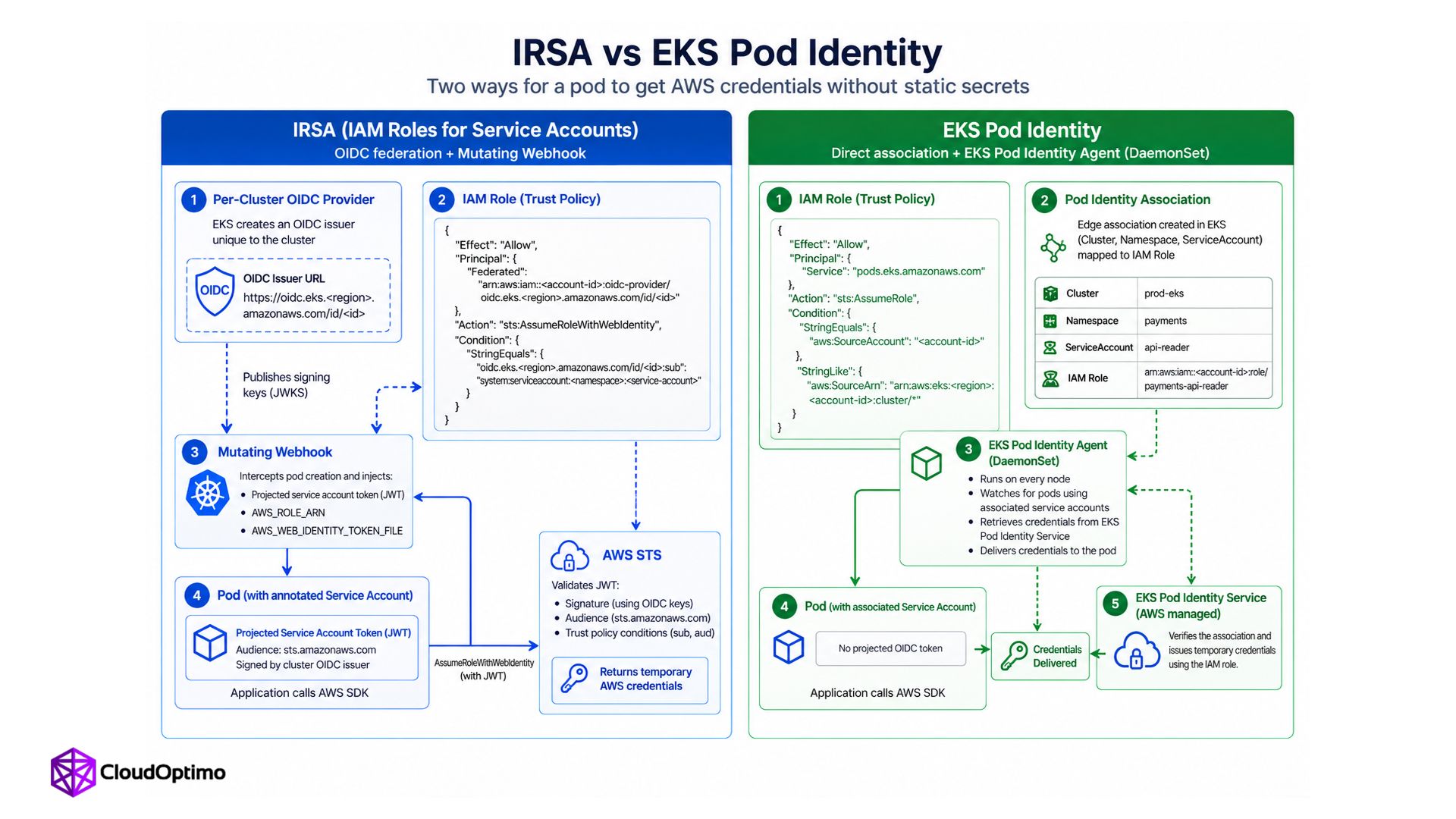
| IRSA (2019) | EKS Pod Identity (2023) | |
|---|---|---|
| Trust mechanism | OIDC federation to a specific cluster | Fixed service principal pods.eks.amazonaws.com plus an EKS Pod Identity association |
| Setup per cluster | Register and maintain an OIDC provider | No OIDC provider needed at all |
| Role reuse across clusters | Requires trust policy edits per cluster | Same role reusable without changes |
| Delivery mechanism | Webhook injects a projected web-identity token and SDK configuration | EKS injects the Pod Identity token and credential-endpoint configuration, while the node-level agent returns temporary credentials |
| Works on Fargate | Yes | No |
Why IRSA Is Not Actually Retired
Pod Identity is positioned as the simpler successor, and for EC2-backed EKS nodes it is. It does not work on AWS Fargate. The Pod Identity Agent runs as a DaemonSet, and Fargate does not run DaemonSets, since Fargate does not expose the underlying node in the way EC2-backed clusters do. Any pod running on Fargate still needs IRSA to authenticate to AWS.
This means a cluster using both EC2-backed nodes and Fargate can end up using IRSA and Pod Identity side by side. You do not necessarily have to migrate everything in one shot either. Both mechanisms can exist in the same cluster while workloads are moved gradually.
One thing worth checking during that migration is which credentials the application is actually using. AWS SDKs have a credential-provider chain, so adding a Pod Identity association does not automatically mean the SDK will start using Pod Identity if another credential source is found earlier in that chain. It is better to verify the credential source than assume the migration worked.
The Same Pattern Outside AWS
The underlying idea, federate a Kubernetes-issued token to cloud IAM instead of storing a static credential, is not AWS-specific, and the mechanics on the other two major clouds follow the same shape closely enough that understanding IRSA makes both of them easy to recognize.
GKE Workload Identity Federation
GKE solves the same problem through the Workload Identity Federation for GKE. A Kubernetes workload can be represented directly as a Google Cloud IAM principal, so permissions can be granted based on the workload's namespace and service account instead of putting a service-account key inside the pod.
The GKE metadata server running on the node handles the credential flow for supported Google Cloud client libraries, so the application can keep using the normal SDK without managing static credentials itself. Google also supports another model where a Kubernetes service account impersonates a Google Cloud IAM service account, which is useful when an application or existing setup still expects that kind of identity.
Azure AD Workload Identity
Azure Workload Identity follows a similar idea. Pods opt in using the azure.workload.identity/use: "true" label, and the admission webhook then injects a projected service account token along with the Azure-related environment variables the workload needs. The Kubernetes service account usually carries the annotations that point to the Azure identity being used.
The application can then exchange that projected token with Microsoft Entra ID for an Azure access token. Again, there is no client secret or certificate sitting inside the pod that someone has to rotate and protect forever.
The specific configuration objects differ by cloud, service account annotations here, IAM policy bindings there, admission webhook labels somewhere else, but the underlying security model is identical everywhere it appears: a short-lived, cluster-issued token stands in for a long-lived static credential, and the cloud provider verifies that token against a trust relationship configured ahead of time before ever handing back real access. Once the pattern is understood on one cloud, recognizing it on another is mostly a matter of learning different resource names for the same idea.
Where This Goes Wrong in Practice
The service account annotation and the IAM role drift apart
A Kubernetes service account annotated with an IAM role ARN and the trust policy on that role need to stay in agreement. A typo in the ARN, a role that gets renamed, or a trust policy edited without updating the matching service account annotation all produce the same generic-looking access denied error, which gives no obvious hint about which side of the relationship actually broke.
Assuming Pod Identity replaced IRSA everywhere
Teams that migrate their EC2-backed workloads to Pod Identity and then assume the migration is complete are often surprised when Fargate-based pods, or workloads on EKS Hybrid Nodes, an area where Pod Identity needs additional setup, quietly keep relying on IRSA underneath. A full audit of which pods run is worth doing before assuming one mechanism has fully replaced the other across an entire cluster.
Debugging a Failed AssumeRole Without Guessing
When workload identity fails, the error surfacing in application logs is almost always some variation of AccessDenied or a generic credential resolution failure, which says nothing about which of several possible points in the chain actually broke. Working through it in order saves time over guessing.
Confirm the pod is actually using the expected service account, since a Deployment missing an explicit serviceAccountName field silently falls back to default, which carries no IAM role at all.
Next, inspect the pod itself instead of assuming the identity setup was injected correctly. For IRSA, check that the projected web-identity token exists and that variables such as AWS_ROLE_ARN and AWS_WEB_IDENTITY_TOKEN_FILE are present. For Pod Identity, check the projected Pod Identity token and the container-credential configuration. Just seeing the token does not prove that the Pod Identity Agent is healthy, so check the agent separately as well.
For IRSA specifically, verify the OIDC provider referenced in the IAM role's trust policy matches the current cluster's OIDC issuer URL exactly. Cluster recreation is a common way this quietly goes stale, since a new cluster gets a new OIDC provider even if its name looks identical to the old one.
For Pod Identity, confirm an actual EKS Pod Identity association exists between the specific service account and the IAM role. Unlike IRSA, this association lives in the EKS API itself, not just in a Kubernetes annotation, and it is easy to update one side without the other.
For IRSA, decoding the JWT is one of the quickest ways to catch a mismatch. Check the aud claim and make sure it is what STS expects, then check sub and confirm it matches the exact system:serviceaccount:<namespace>:<service-account> value allowed by the trust policy.
For Pod Identity, the checks are slightly different. Confirm that the token audience is pods.eks.amazonaws.com, that the Pod Identity association exists for the right namespace and service account, and that the Pod Identity Agent is healthy. It is also worth checking that the AWS SDK version in the application supports the container credential provider used by Pod Identity and that the IAM role trusts pods.eks.amazonaws.com.
The Actual Lesson Here
The specific tool names change. IRSA, EKS Pod Identity, Workload Identity Federation for GKE, and Azure Workload Identity are all trying to solve the same problem: letting a workload prove who it is and get short-lived cloud credentials without keeping a permanent access key or secret inside the cluster.
The part worth actually remembering is not which acronym is currently fashionable. It is that the security of the entire system lives in how tightly that trust relationship is scoped, and that a newer, simpler mechanism replacing an older one does not always mean the older one is gone. Sometimes it just means there are now two mechanisms to understand instead of one.

