
A Kubernetes Pod can run one or more containers that work together as a single application unit. Traditionally, CPU and memory requirements have been defined mainly at the container level, even when several containers belong to the same Pod.
Kubernetes has been extending this model so resources can also be defined for the Pod as a whole. Pod-Level Resources became Beta in Kubernetes 1.34. Kubernetes 1.37 builds on this by moving Pod-Level Resource Managers to Beta, allowing the kubelet’s CPU, Memory, and Topology Managers to use Pod-level resource specifications when making allocation decisions. The feature remains disabled by default.
1. How Kubernetes Traditionally Manages Pod Resources
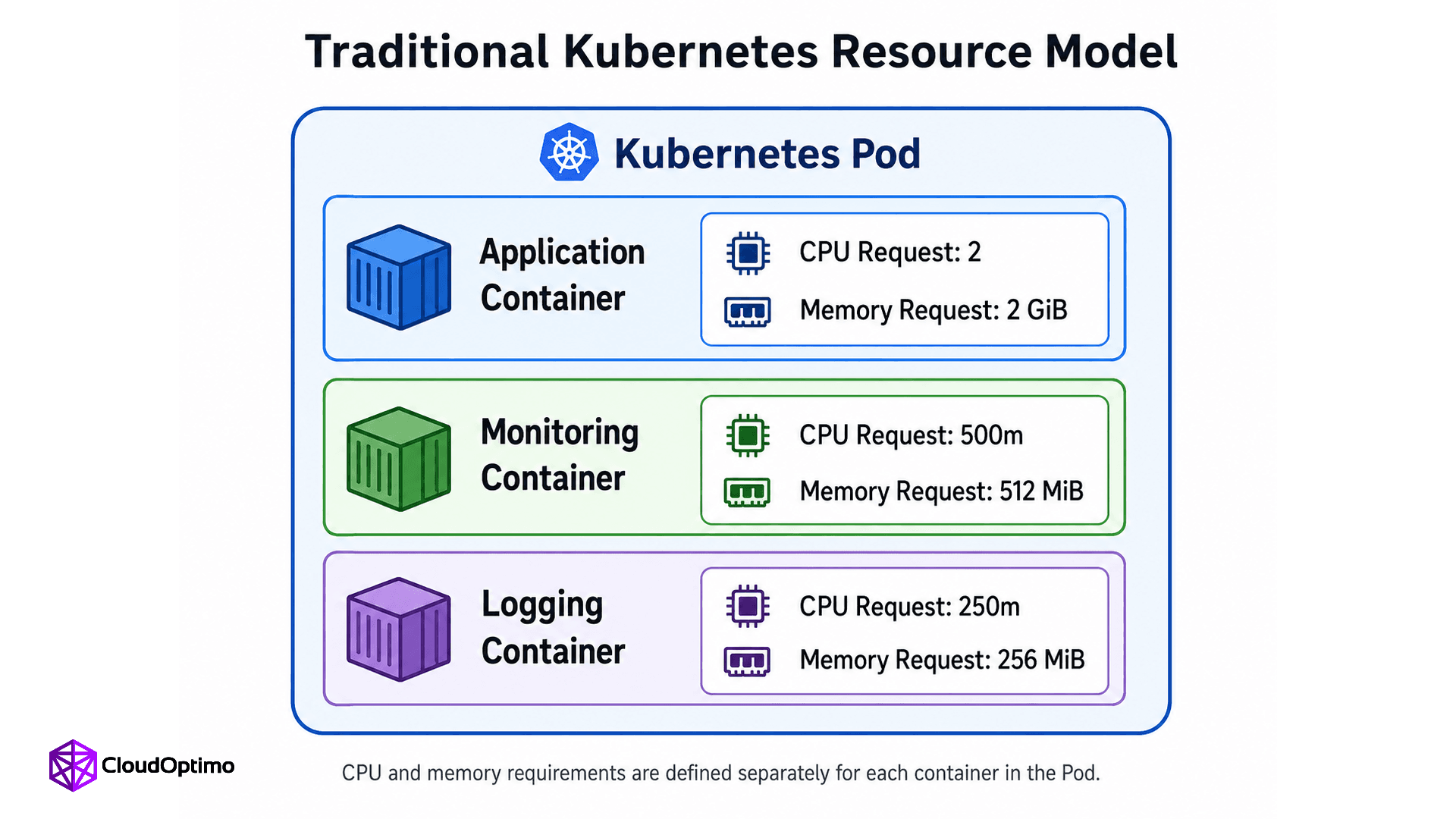
Fig 1: CPU and memory requirements are defined separately for each container within the Pod, with each container having its own resource request.
1.1 Resource Requests and Limits at the Container Level
Kubernetes uses resource requests and limits to describe how much CPU and memory a container needs.
A request tells Kubernetes how much of a resource to consider when scheduling the Pod. The scheduler uses these requests to select a node with enough available capacity. A limit sets a boundary on how much of that resource a running container can use.
In a multi-container Pod, each container can have its own requests and limits. Kubernetes can then account for these individual requirements when determining the resources needed by the Pod.
1.2 Resource Management After a Pod Is Scheduled
After the scheduler places a Pod on a node, the kubelet manages it and helps enforce its resource configuration.
Kubernetes also provides specialized kubelet resource managers. The CPU Manager handles CPU allocation, the Memory Manager handles memory placement, and the Topology Manager coordinates allocation decisions based on the node's hardware topology.
Historically, these managers primarily worked with resource requirements defined for individual containers. Pod-Level Resource Managers extend that model, which we will cover later.
2. Pod-Level Resources Changed the Resource Boundary
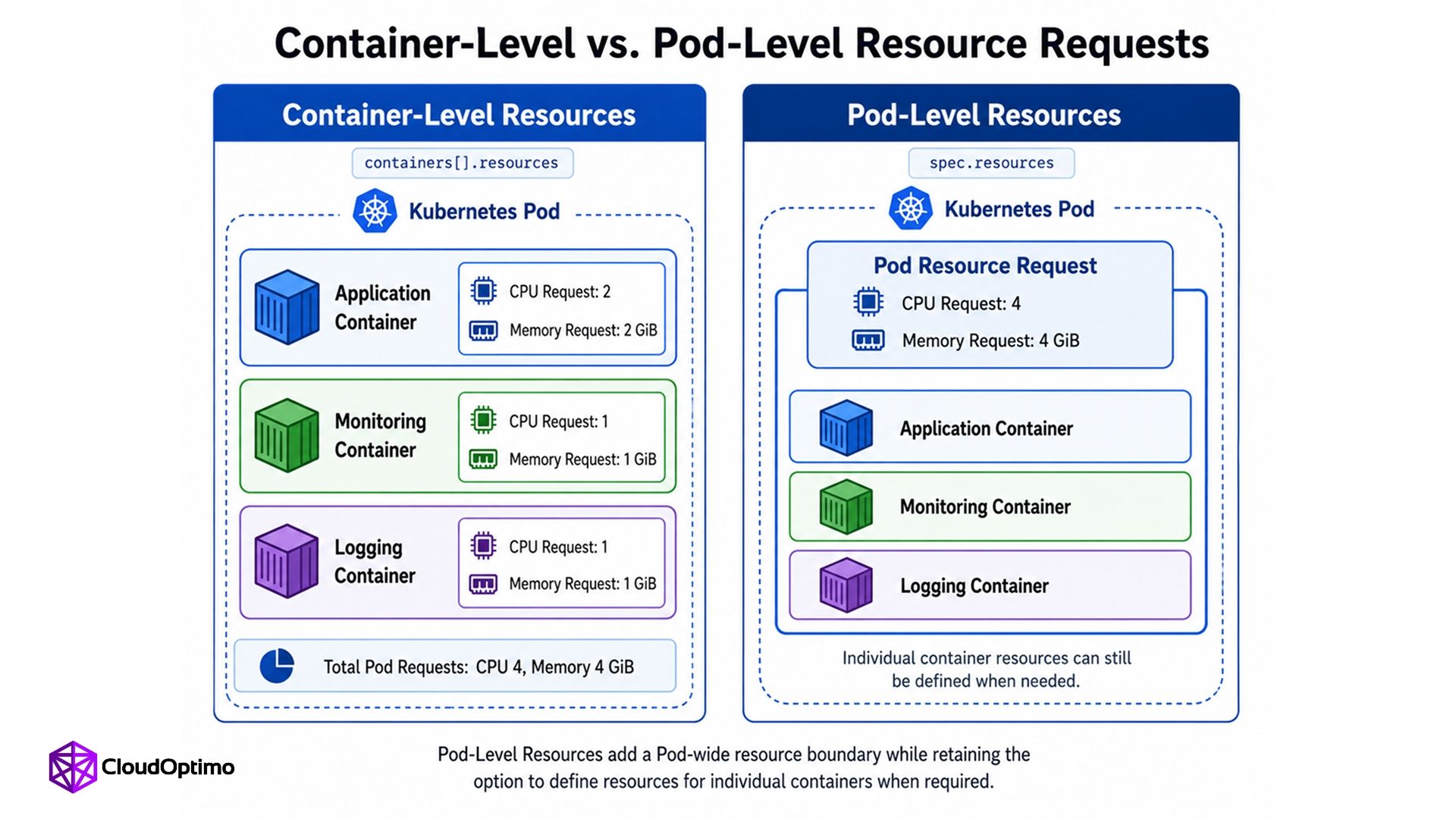
Fig 2: Container-level resources assign CPU and memory to individual containers, while Pod-level resources define a shared resource budget for the Pod as a whole.
2.1 What Are Pod-Level Resources?
Pod-Level Resources allow CPU and memory requirements to be defined for the entire Pod through spec.resources. The feature became Beta in Kubernetes 1.34 and is enabled by default.
This creates an overall resource budget for the Pod. Individual containers can still have their own resource settings when needed, while containers without their own settings can operate within the Pod-level resource boundaries. Kubernetes also allows containers within a Pod to share idle resources available inside that budget.
2.2 Container-Level vs. Pod-Level Resources
| Container-Level Resources | Pod-Level Resources |
| Resources are defined per container | Resources are defined for the whole Pod |
| Containers can have individual resource budgets | Containers operate within an overall Pod resource budget |
| Uses containers[].resources | Uses spec.resources |
| Useful when container requirements need separate sizing | Useful when resources also need to be managed at the Pod level |
2.3 A Simple Pod-Level Resource Example
| spec: resources: requests: cpu: "4" memory: "4Gi" |
This requests four CPUs and 4 GiB of memory for the Pod as a whole. Individual containers can still define their own resources when more specific control is required.
3. What Kubernetes 1.37 Adds with Pod-Level Resource Managers
3.1 Pod-Level Resources vs. Pod-Level Resource Managers
Pod-Level Resources and Pod-Level Resource Managers are related, but they serve different purposes.
PodLevelResources allows a workload to define an overall CPU and memory budget through spec.resources. It describes how much resource the Pod requires.
PodLevelResourceManagers extends this information to the kubelet's CPU, Memory, and Topology Managers. When enabled, these managers can use the Pod-level resource specification when deciding how CPU and memory should be allocated and aligned on the node.
In simple terms, Pod-Level Resources define the resource boundary, while Pod-Level Resource Managers determine how specialized resource management can operate within that boundary.
3.2 Feature Status in Kubernetes 1.37
| Feature | Purpose | Status |
| PodLevelResources | Defines resources at the Pod level | Beta since Kubernetes 1.34, enabled by default |
| PodLevelResourceManagers | Extends CPU, Memory, and Topology Managers to Pod-level resources | Beta in Kubernetes 1.37, disabled by default |
Pod-Level Resource Managers first appeared as an Alpha feature in Kubernetes 1.36 and moved to Beta in Kubernetes 1.37. Cluster administrators must still explicitly enable the PodLevelResourceManagers feature gate to use it.
4. How Pod-Level Resource Allocation Works
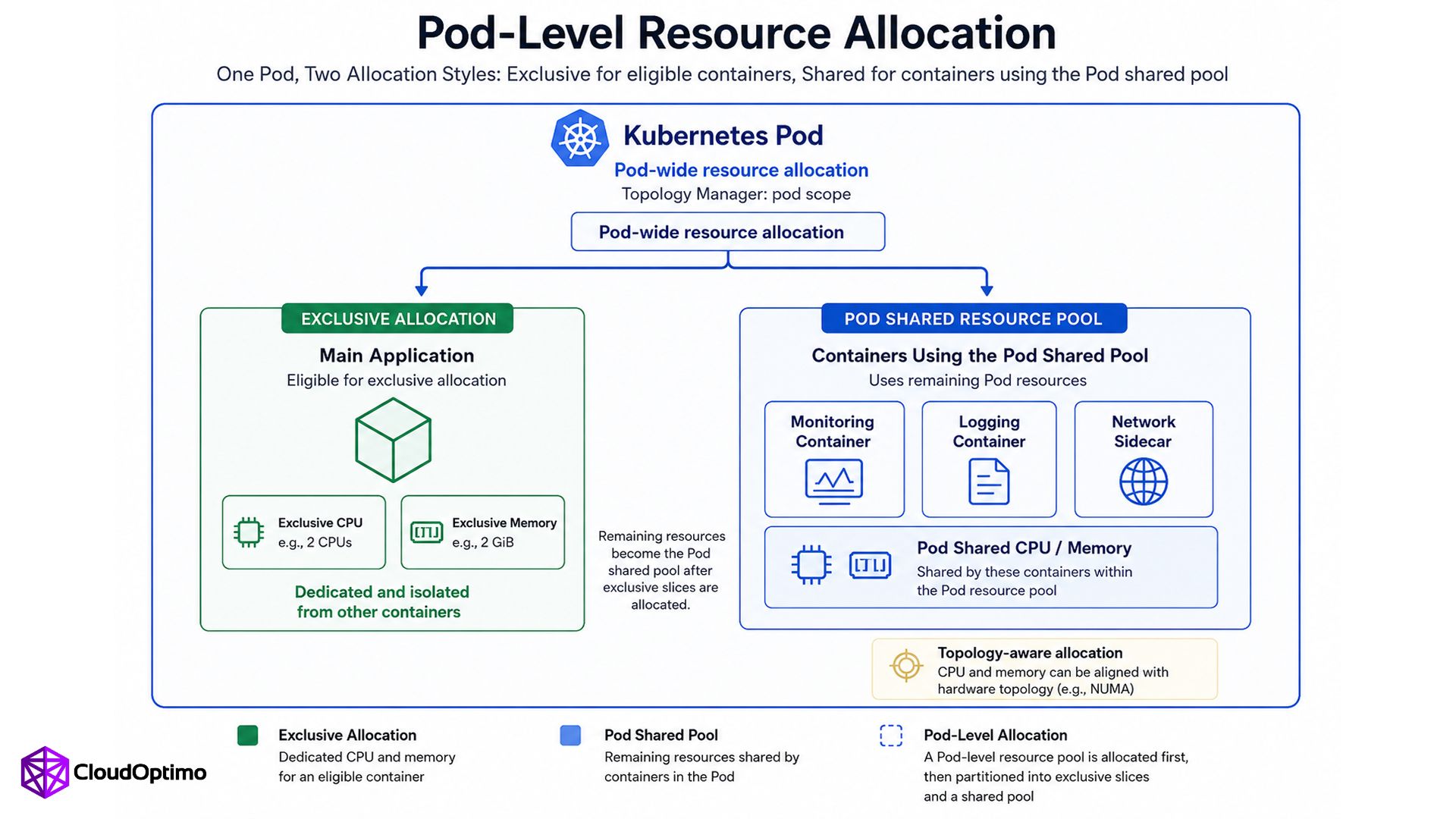
Fig 3: Pod-Level Resource Managers can allocate exclusive CPU and memory to an eligible container while allowing other containers in the same Pod to share the remaining Pod resources.
4.1 Exclusive Resources
Some workloads require predictable access to CPU and memory. Kubernetes resource managers can provide eligible containers with an exclusive slice, such as specific CPU cores or dedicated memory resources, rather than having them compete for the same resources with other containers.
This is useful when predictable resource access is important for application performance.
4.2 The Pod Shared Resource Pool
When the Topology Manager uses pod scope, the kubelet can allocate resources for the Pod as a whole. Containers that qualify for exclusive allocation receive their dedicated portion first.
The resources that remain form a Pod shared pool. Containers that do not receive exclusive allocations can share this remaining capacity. The shared pool is kept separate from both the exclusive slices and the general node-wide shared pool.
4.3 Combining Exclusive and Shared Resources
This creates a hybrid resource model within one Pod.
A performance-sensitive container can use dedicated resources, while supporting containers such as logging or monitoring components can share the remaining Pod resources. This avoids requiring every container in the Pod to receive the same type of exclusive allocation.
4.4 Why Hardware Topology Matters
Modern servers can contain multiple NUMA nodes, where processors have faster access to some areas of memory than others.
For workloads sensitive to memory access latency, the location of CPU and memory resources can therefore matter. Kubernetes' Topology Manager coordinates resource allocation so that CPU and memory can be appropriately aligned with the underlying hardware topology. With Pod-Level Resource Managers, this alignment can also consider the Pod-level resource specification.
5. Understanding It Through a Multi-Container Pod
5.1 Example: A Payment Service Pod
Consider a payment service running as a multi-container Pod:
1. Payment application
2. Service-mesh sidecar
3. Metrics collector
4. Logging sidecar
The containers belong to the same workload, but they do not necessarily have identical resource requirements.
5.2 Separating Predictable and Variable Resource Needs
The payment application may require predictable CPU and memory access because variations in resource availability could affect request processing.
Supporting containers perform important functions, but their resource usage may vary. A metrics collector, for example, may periodically process monitoring data, while a logging container handles application output as it is generated.
Giving every supporting container an exclusive resource allocation may therefore be unnecessary for this type of configuration.
5.3 How Pod-Level Resource Managers Handle the Pod
Assuming the Topology Manager is configured with pod scope, the Pod can receive an overall resource allocation based on spec.resources.
An eligible payment application container can receive an exclusive portion of those resources. The remaining capacity can form the Pod shared pool, where the service-mesh, metrics, and logging containers share resources without using the application's exclusive allocation.
This allows Kubernetes to manage different resource requirements within the same Pod while retaining an overall Pod-level resource boundary.
6. Where Pod-Level Resource Managers Make Sense
6.1 Performance-Sensitive Workloads
Pod-Level Resource Managers are most relevant when the way CPU and memory are allocated can affect application performance.
Examples include machine-learning training, low-latency databases, high-throughput applications, and other latency-sensitive services. These workloads may benefit from predictable CPU access, controlled memory placement, or keeping related CPU and memory resources close together on the underlying hardware. Kubernetes Resource Managers are designed specifically to support latency-critical and high-throughput workloads that have such requirements.
6.2 Multi-Container Pods with Different Resource Requirements
The feature is also relevant when containers within the same Pod have different resource needs.
A primary application may require dedicated resources for predictable performance, while supporting containers for logging, monitoring, networking, or data collection can operate using shared resources.
Pod-Level Resource Managers allow Kubernetes to combine these requirements within the same Pod. Some containers can receive exclusive resources while others use the remaining Pod-level shared pool.
6.3 When You Probably Don't Need It
Not every Kubernetes workload requires this level of resource control.
Many web applications and general-purpose services work effectively with conventional CPU and memory requests and limits. Kubernetes notes that many workloads are not sensitive to CPU movement between cores and operate normally without additional CPU management policies.
Teams should therefore consider Pod-Level Resource Managers when there is a clear requirement for controlled allocation, rather than treating the feature as a default requirement for every application.
7. Limitations and What Teams Should Know
7.1 Kubernetes 1.37 Feature Status
Pod-Level Resource Managers are Beta in Kubernetes 1.37 and remain disabled by default. The feature must be explicitly enabled through the PodLevelResourceManagers feature gate.
The functionality is currently supported only on Linux nodes. On Windows nodes, Kubernetes does not perform Pod-level allocation through these resource managers.
7.2 Resource Manager Requirements
Support is currently limited to specific resource-manager policies.
For CPU allocation, Pod-Level Resource Managers work with the CPU Manager's static policy. For memory allocation, they work with the Memory Manager's Static policy. The Memory Manager's BestEffort policy is not supported for Pod-level resource management.
7.3 Adoption Considerations
Before enabling the feature, teams should determine whether their workloads actually require exclusive resources, topology-aware placement, or a combination of dedicated and shared resources.
Clusters also need the appropriate kubelet resource-manager configuration and the required feature gates enabled.
For workloads that do not depend on these capabilities, conventional resource requests and limits may remain sufficient.
8. What Pod-Level Resource Management Means for Resource Efficiency
8.1 Moving Beyond Isolated Container Budgets
A Pod-wide resource definition allows Kubernetes to represent the resource requirements of a multi-container workload as a whole rather than relying only on separate container budgets.
Container-level controls remain available, but the Pod gains an additional resource boundary that can represent the workload collectively.
8.2 Improving Resource Utilization
One benefit of Pod-Level Resources is that containers within the Pod can share resources that are currently idle. This can be useful when several containers have changing resource requirements and do not reach their peak usage at the same time.
Pod-Level Resource Managers add another layer by allowing exclusive allocations and shared Pod resources to coexist.
This provides more flexibility in how available CPU and memory are divided within the workload.
8.3 From Resource Efficiency to Infrastructure Efficiency
The relationship can be viewed as:
Better workload resource definition
↓
More flexible resource allocation
↓
Better resource utilization
↓
Potentially improved node efficiency
↓
Potential infrastructure cost improvement
This does not mean enabling Pod-Level Resource Managers automatically reduces Kubernetes costs. The financial impact depends on workload behavior, resource configuration, node capacity, and how effectively available infrastructure is used.
From a FinOps perspective, the important change is that teams have another way to represent and manage the actual resource requirements of multi-container workloads. More accurate resource allocation can support better infrastructure decisions without assuming a guaranteed level of savings.
To Conclude Kubernetes Is Becoming More Pod-Aware
Kubernetes is not replacing container-level resource management. Instead, it is adding the ability to manage resources at another level.
The progression is straightforward:
Container-level resources
↓
Pod-level resources
↓
Pod-Level Resource Managers
Pod-Level Resources allow CPU and memory to be defined for the workload as a whole. Kubernetes 1.37 extends that model by allowing the kubelet's CPU, Memory, and Topology Managers to use those Pod-level definitions when making allocation decisions.
For workloads that need predictable or topology-aware resource placement, this provides a more flexible way to manage the Pod as a complete resource unit while retaining control over individual containers.

