1. What is Google Dialogflow?
Google Dialogflow is a cloud-based conversational AI platform that enables applications to understand natural language and convert user input into structured actions.
At a fundamental level, Dialogflow acts as an interpretation layer between users and backend systems. It takes raw input text or voice and translates it into intent-driven workflows.
Its core responsibilities include:
Identifying user intent
- Extracting structured parameters (entities)
- Triggering responses or backend operations
This abstraction significantly reduces the complexity of building conversational systems. However, it does not eliminate the need for architectural discipline. Dialogflow simplifies language understanding, but the responsibility for designing scalable, reliable systems still lies with the developer.
2. How Dialogflow Works in Practice
A Dialogflow interaction is not a black box-it follows a defined processing pipeline. At a high level, the flow looks like this:
- A user submits input (text or voice)
- The platform processes the input using natural language models
- The input is matched against configured intents
- Relevant entities are extracted into structured parameters
- Context is evaluated to maintain conversational state
- A webhook may be invoked for external logic or data retrieval
- A response is generated and returned to the user
This sequence is conceptually simple but operationally fragile.
In real-world systems, failures rarely originate from the platform itself. They emerge from implementation gaps. The most common issues include intent collision, weak training data, and poorly managed context. These are not edge cases-they are predictable outcomes of insufficient structure.
The critical point is this: Dialogflow provides the framework, not the reliability. System behavior depends on how well this pipeline is defined, trained, and maintained over time.
If intent boundaries are unclear, matching becomes inconsistent. If the training data is shallow, accuracy drops. If context handling is unreliable, conversations break.
There is no shortcut here-quality comes from disciplined design.
3. Core Components That Define System Behavior
Understanding Dialogflow requires looking beyond definitions. Each component directly affects how the system behaves under real conditions. Poor structure at any level leads to instability.
1. Intents - Defining User Goals
Intents represent user intention, but the real problem is not creating them-it is controlling their boundaries.
A simple mapping like “Book a flight” to a booking intent works in isolation. It breaks when similar phrases start overlapping across multiple intents. As the system grows, weak separation between intents causes incorrect matches and unpredictable responses.
The fix is strict intent design: reduce overlap, enforce clear scope, and continuously refine training data based on real queries.
2. Entities - Structuring Data
Entities convert raw input into usable data, but they only work if they are precise.
Basic extraction, like dates, locations, or quantities, is easy. The difficulty appears when inputs vary in format or ambiguity increases. Poorly defined entities result in missing or incorrect parameters, which directly impact downstream logic.
You need controlled vocabularies, validation, and fallback handling. Without that, the system reacts-it does not operate reliably.
3. Contexts - Managing State
Contexts allow conversations to persist, but they are also the most common failure point.
A follow-up input like “Delhi” only makes sense if prior context exists. Without it, the system loses meaning. With a poorly managed context, it misfires, triggering wrong intents or skipping steps entirely.
The solution is disciplined lifecycle control: define when contexts start, how long they live, and when they must be cleared. Anything else leads to broken conversation flows.
4. Fulfillment - Executing Logic
Fulfillment is when the system becomes functional rather than static.
This layer handles API calls, applies business rules, and produces real outcomes. Skipping fulfillment and embedding logic directly into responses is a structural mistake. It creates rigid flows that cannot scale or adapt.
The correct approach is separation of concerns: keep Dialogflow focused on interpretation, and move all execution logic to backend services.
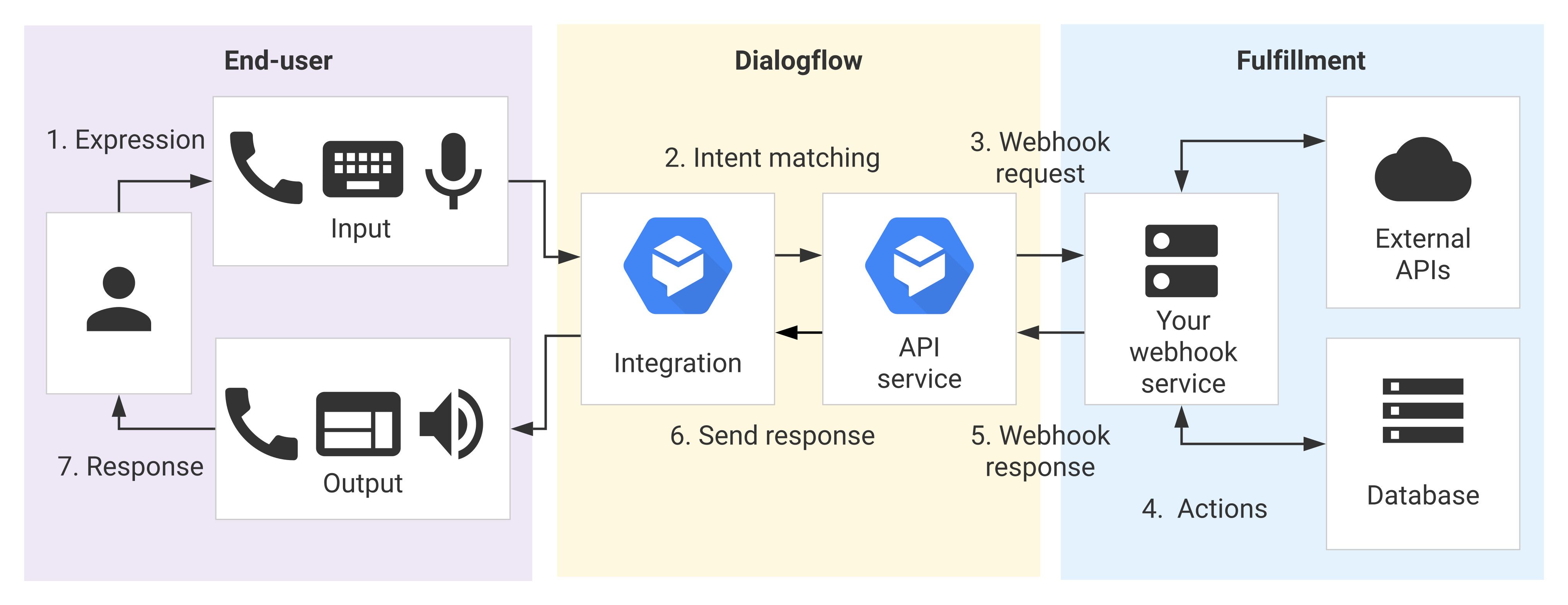
4. How Dialogflow Works: End-to-End Flow
Source: Google Docs
At a surface level, the interaction flow is straightforward. A user submits input, the system interprets it, matches an intent, extracts entities, evaluates context, optionally calls a webhook, and returns a response.
This linear view is accurate-but incomplete. It hides where systems actually fail.
Each stage introduces risk. Intent matching degrades with ambiguous inputs. Entity extraction fails when data is inconsistent. Context handling becomes unstable when the state is not tightly controlled. Webhooks add external dependencies that can fail or introduce latency.
These failures are not isolated-they compound. A minor issue in one stage can cascade through the entire interaction.
The pipeline appears deterministic, but the inputs are not. Natural language introduces ambiguity, and the system reflects that variability.
Reliability depends on how each stage is constrained, tested, and continuously refined.
5. Dialogflow ES vs CX: Choosing the Right Model
| Feature | ES (Essentials) | CX (Customer Experience) |
| Design Approach | Intent-based | Flow-based |
| State Handling | Limited | Advanced |
| Complexity Support | Low | High |
| Best Use Case | Simple bots | Complex systems |
Practical Decision Criteria
- Use ES for small, linear workflows
- Use CX for multi-step, stateful interactions
Key Observation
As the number of intents and dependencies increases, ES becomes difficult to manage. CX introduces structured flow control, making it more suitable for large-scale applications.
6. Strengths of Dialogflow
Dialogflow is widely adopted because it removes several practical barriers that typically slow down conversational system development. Its strengths are real, but only when used correctly.
1. Reduced NLP Complexity:
Dialogflow eliminates the need to build language models from scratch. It provides pre-trained natural language understanding that works out of the box.
This significantly reduces development time, but it does not remove the need for structured training data. If your inputs are poorly defined, accuracy still degrades.
2. Multi-Platform Integration:
The platform supports deployment across web, mobile, and voice interfaces, including Google Assistant.
This flexibility simplifies distribution, but consistency becomes your responsibility. The same intent must behave correctly across all channels, which requires strict design control.
3. Scalable Infrastructure:
Dialogflow runs on Google Cloud infrastructure, which automatically handles scaling.
This removes operational overhead, but it does not protect you from logical failures. Poorly designed intent will scale the problem, not solve it.
4. Flexible Language Handling:
The system can interpret variations in user input, improving usability in real conversations.
However, this flexibility is often overestimated. Without sufficient training data and clear intent boundaries, the system becomes inconsistent rather than intelligent.
While these strengths make Dialogflow attractive, they also introduce trade-offs that become visible at scale.
7. Where Dialogflow Fails in Real Systems
Understanding limitations is essential for building stable systems.
1. Intent Collision: As the system grows, intent boundaries blur. Similar inputs begin matching multiple intents, leading to inconsistent routing.
This requires restructuring the intent scope and reducing overlap, not simply adding more training data.
2. Context Leakage: Contexts often persist longer than intended, carrying state into unrelated interactions. This results in incorrect intent triggers and broken flows.
Proper lifecycle control-activation, expiration, and cleanup-is critical.
3. Debugging Complexity: When intent matching fails, identifying the cause is difficult. The system provides limited visibility into decision-making.
Without structured logging and testing, debugging becomes slow and unreliable.
4. Over-Reliance on Training Data: Adding more training phrases is often treated as a fix. In reality, it increases ambiguity. If intent boundaries are weak, more data amplifies the problem instead of solving it.
These limitations typically emerge as the system evolves from a prototype into production.
8. Scaling Reality: From Prototype to Production
Scaling a Dialogflow system is where most implementations start to break. What works in a prototype rarely survives real usage without structural changes.
1. Early Stage: At the beginning, the system is small and controlled. A limited number of intents, minimal context handling, and predictable inputs make behavior appear stable.
This stage is misleading. The simplicity comes from low complexity, not from a robust design.
2. Growth Phase: As usage increases, dependencies start to accumulate. More intents are added, context handling becomes layered, and backend integrations expand.
This is where cracks appear. Maintenance overhead increases, and small design flaws begin to surface as inconsistent behavior.
3. Maturity Stage: At scale, intent overlap becomes unavoidable if the system was not designed with strict boundaries. As context interactions grow more complex to control, debugging becomes slow and inefficient.
At this point, stability is no longer a tuning problem-it is an architectural problem. Incremental fixes stop working.
The only viable path forward is structural change. Transitioning to more controlled, flow-based systems like Dialogflow CX becomes necessary to manage complexity and restore predictability.
9. Dialogflow vs Other Platforms
| Feature | Dialogflow | Amazon Lex | Rasa |
| Hosting | Cloud (Google) | Cloud (AWS) | Self-hosted |
| Control | Medium | Medium | High |
| Setup Speed | Fast | Fast | Slow |
| Customization | Limited | Limited | Extensive |
Practical Insight
- Use Dialogflow for speed and ease
- Use Rasa for control and customization
- Use Lex if already in the AWS ecosystem
To understand how these components work together, it is useful to examine a real-world interaction.
10. Real Example: Flight Booking Chatbot
A practical example makes the separation of responsibilities clear in Dialogflow.
1. User Input
A user provides a natural language request:
“I want to book a flight to Delhi tomorrow.”
This input is unstructured and ambiguous by default. The system’s job is to impose structure.
2. Intent Matching
The request is mapped to a defined intent, such as BookFlight.
This step only works reliably if intent boundaries are tight. If similar intentions exist, misclassification becomes likely.
3. Entity Extraction
Key data points are extracted from the input. “Delhi” becomes the destination, and “tomorrow” becomes the date.
If entity definitions are weak or inconsistent, this step fails silently and breaks downstream logic.
4. Context Activation
A booking context is activated to maintain state across the interaction.
This ensures that follow-up inputs are interpreted correctly. Without strict context control, the conversation quickly loses coherence.
5. Fulfillment Call
The system triggers backend logic via an API. Availability is checked, and flight options are retrieved.
This is the execution layer. Without it, the system cannot perform real tasks.
6. Response
A structured response is returned to the user:
“ Flights are available at 10 AM and 6 PM. Which do you prefer? ”
The response is only as accurate as the data returned by the backend.
Key Takeaway
Dialogflow handles interpretation, understanding user intent, and extracting data. Execution belongs entirely to the backend. Mixing these responsibilities leads to rigid, unreliable systems.
Beyond architecture and design, cost becomes a critical factor in long-term system viability.
11. Cost Considerations
The cost in Dialogflow is frequently misjudged because teams focus on setup rather than long-term operations.
1. Direct Costs:
At a basic level, you pay per request. This includes intent detection and any associated processing.
(i) Dialogflow ES typically costs ~$0.002 per text request
(ii) Dialogflow CX can range from ~$0.007 to $0.012 per request, depending on usage
At low traffic, this appears negligible. At scale, millions of requests per month, this becomes a significant expense.
The key mistake is assuming a linear cost impact without considering growth.
2. Indirect Costs:
The higher cost sits outside the platform.
Backend infrastructure, API reliability, testing pipelines, and engineering effort quickly dominate total spend.
Typical impact areas:
(i) Backend hosting and APIs - $50 to $500+/month (small to mid systems)
(ii) Engineering time - the most expensive component (often 70–80% of total cost)
(iii) Maintenance overhead - increases as intents and contexts grow
These costs scale with complexity, not just traffic.
3. Practical Perspective:
Dialogflow reduces initial development effort, which creates the illusion of low cost.
That advantage fades as the system grows. Complexity introduces ongoing costs in maintenance, debugging, and system design.
If the architecture is not designed for scale, operational costs-both technical and human-will exceed any savings from faster initial development.
12. Best Practices for Production Systems
Production stability in Dialogflow is not achieved through features-it comes from disciplined design decisions.
1. Intent Design: Intents must be tightly scoped. Broad or overlapping intents create ambiguity and degrade accuracy. Define clear boundaries and continuously refine them using real interaction data. If two intents can match the same input, your design is already flawed.
2. Context Usage: Contexts should be used with precision, not convenience. Overusing them creates hidden dependencies that are hard to track and debug. Limit their lifespan, control activation explicitly, and remove them as soon as they are no longer needed.
3. Backend Responsibility: All business logic belongs outside Dialogflow. Embedding logic in responses creates rigid systems that cannot scale or adapt. Use backend services for decision-making, validation, and data processing. Dialogflow should only interpret input.
4. Fallback Strategy: Fallbacks are not optional-they are a core part of system design. Handle ambiguity explicitly. Provide controlled recovery paths instead of generic failure messages. Poor fallback design leads to user frustration and drop-offs.
5. Real-World Testing: Testing with synthetic phrases is insufficient. Real users introduce variation, ambiguity, and unexpected inputs. Continuously test, monitor, and refine using actual interaction data. Without this, the system will degrade over time.
These are not guidelines-they are constraints. Ignoring them results in unstable, unpredictable systems.
13. Common Implementation Mistakes
Most failures in Dialogflow systems are not technical-they are structural. The same mistakes repeat across projects.
1. Overloaded Intents: Combining multiple responsibilities into a single intent creates ambiguity. The model cannot reliably infer the user's intent because the intent itself is poorly defined. Split intents by purpose, not convenience. One intent should represent one clear outcome.
2. Ignored Edge Cases: Conversation flows are often designed for ideal inputs, not real behavior. Users deviate, interrupt, or provide incomplete data. If edge cases are not handled explicitly, the system breaks outside the “happy path.”
3. Weak Fallbacks: Generic fallback responses signal failure without recovery. They do not guide the user back into a valid flow. Fallbacks must be structured, contextual, and actionable. Otherwise, users drop off immediately.
4. Poor Naming Conventions: Inconsistent or vague naming makes the system harder to maintain and debug. As complexity grows, this turns into operational friction. Use clear, predictable naming for intents, entities, and contexts. Treat it as part of system design, not documentation.
5. Lack of Monitoring and Logging: Without visibility, failures go unnoticed until users report them. This delays fixes and increases system instability. Implement logging for intent matches, failures, and edge cases. Monitor patterns and iterate continuously. These are not minor issues. Each one directly increases inconsistency and long-term maintenance cost.
14. When Not to Use Dialogflow
Dialogflow is effective within its boundaries. Outside those boundaries, it becomes a constraint rather than a solution.
1. Need for Full NLP Control: If your system requires control over model behavior, training pipelines, or custom architectures, Dialogflow is limited.
It abstracts too much. You cannot fine-tune models at a low level or fully control how predictions are made. In these cases, frameworks like Rasa are more appropriate because they expose the underlying mechanics.
2. Highly Dynamic Conversations: Dialogflow works best with structured, intent-driven flows. When conversations become highly dynamic, non-linear, or exploratory, the intent-based approach starts to break down.
You end up forcing unpredictable inputs into rigid structures, leading to a poor user experience and constant rework.
3. Vendor Dependence Constraints: Dialogflow is tightly coupled with Google Cloud. If vendor independence, data control, or on-premise deployment is a requirement, this becomes a blocker.
Moving away later is expensive. The architecture is not designed for portability.
In these scenarios, choosing Dialogflow is not just suboptimal-it creates long-term technical debt that is difficult to unwind.
15. The Role of Dialogflow in Modern Cloud Systems
Dialogflow reflects a broader shift in cloud computing: complex AI capabilities are delivered as managed services rather than built from scratch.
This accelerates development by abstracting natural language processing. What previously required specialized expertise can now be configured through a platform.
However, this abstraction shifts complexity into other areas.
System architecture becomes the primary concern. You need to define how components interact, how conversational state is maintained, and how backend systems execute logic. Weak design in any of these areas results in inconsistent behavior.
State management is a key challenge. Conversations span multiple steps, and maintaining continuity requires precise control over context.
Backend integration is equally critical. Dialogflow can interpret user input, but execution-data validation, business logic, and decision-making remain external.
Dialogflow fits into modern systems as an interpretation layer. Its effectiveness depends on how well it is integrated into a larger, well-structured architecture.