
1. What Is a Vector Database, and Why Is Everyone Suddenly Using One?
What Is a Vector Database?
A vector database is a specialized database that stores vector embeddings—numerical representations of data generated by machine learning models. Unlike traditional databases that retrieve information using exact values or keywords, a vector database performs similarity search, returning results that are semantically related to a user's query.
Because embeddings can represent text, images, audio, code, and videos, vector databases are widely used in modern AI applications that need to understand meaning rather than simply match words.
Why Are Vector Databases Becoming So Popular?
The rapid adoption of Large Language Models (LLMs) has significantly increased the demand for vector databases. While LLMs can generate human-like responses, they cannot access your organization's private documents or continuously learn new information after training.
Vector databases solve this challenge by retrieving the most relevant information from your own data and supplying it to the LLM during inference. This enables AI applications to answer questions using up-to-date and domain specific knowledge instead of relying only on the model's pre-trained knowledge.
Where Are They Used?
Vector databases have become a core component of many AI-powered systems, including:
- Retrieval Augmented Generation (RAG)
- Enterprise AI assistants
- Semantic search engines
- Recommendation systems
- Image and multimedia search
- Code search and developer tools
As organizations continue to build AI driven applications, vector databases have become an essential part of the modern AI stack, enabling fast and accurate retrieval over large collections of unstructured data.
2. How It Actually Finds Things
Data Is Converted into Vector Embeddings
Before a vector database can search your data, the data must first be converted into vector embeddings using an embedding model. An embedding is a list of numbers that captures the meaning of the data instead of the exact words.
For example, the sentences "Reduce AWS costs" and "Optimize cloud spending" have different wording but similar meaning, so their embeddings are placed close to each other in the vector space.
Key Point: Embedding models generate vectors, while vector databases store and search them.
Vectors Are Indexed for Fast Search
After embeddings are stored, the vector database builds an Approximate Nearest Neighbor (ANN) index. Without an index, every search would compare the query with every stored vector (O(N) time complexity), which becomes slow as the dataset grows.
The two most common ANN indexing algorithms are:
- HNSW – Organizes vectors as a graph, providing high search accuracy and low latency. It is the preferred choice for most production systems.
- IVF – Groups similar vectors into clusters, reducing memory usage and improving search speed, though it may return slightly less accurate results than HNSW.
The User Query Is Also Converted into a Vector
When a user searches, the query is converted into a vector using the same embedding model. This ensures that both the stored data and the query exist in the same vector space and can be compared accurately.
Similarity Search Finds the Closest Matches
Instead of searching for matching keywords, the vector database compares the query vector with stored vectors and returns the nearest ones based on a similarity metric.
The most common similarity metrics are:
- Cosine Similarity – Compares the angle between vectors and is the most widely used metric for text embeddings.
Cosine Similarity(A,B)=A⋅B/(∥A∥∥B∥) - Euclidean Distance – Measures the straight line distance between vectors. Smaller distance means greater similarity.
- Dot Product – Measures similarity using the product of vector components and is commonly used with normalized embeddings.
The Top Results Are Returned
Finally, the vector database returns the Top-K most similar results (such as Top-5 or Top-10). In a RAG application, these retrieved documents are passed to the LLM, enabling it to generate answers based on your organization's data instead of relying only on its pre-trained knowledge.
3. Where does it fit in an AI application?
Why Do LLMs Need a Vector Database?
Large Language Models (LLMs) like GPT, Claude, Gemini, and Llama generate responses based on the knowledge they learned during training. However, they cannot access your latest company documents, databases, or private knowledge unless that information is provided when answering a question.
This is where a vector database becomes an essential part of the AI application.
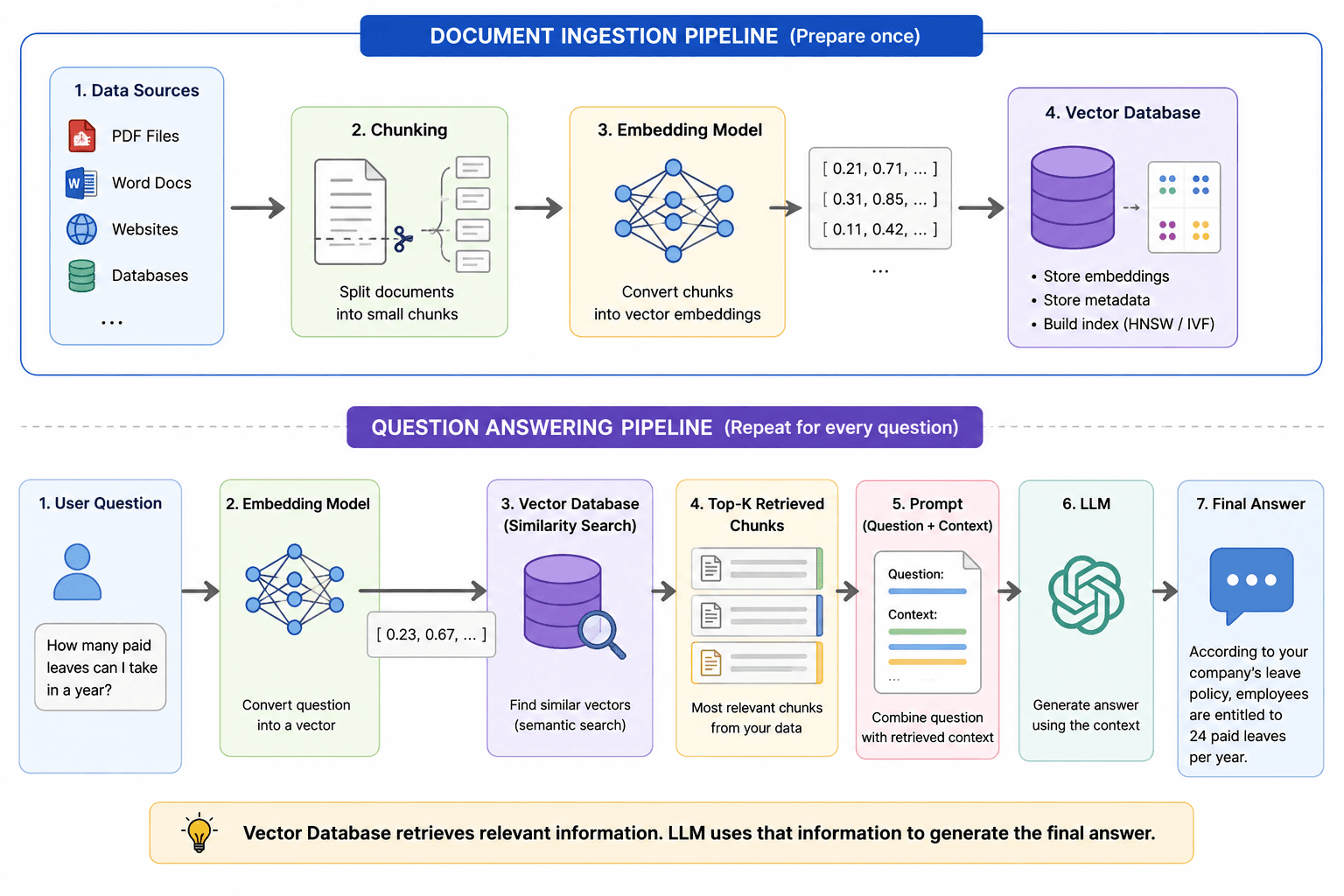
How Does It Work in a RAG Pipeline?
In a Retrieval Augmented Generation (RAG) pipeline, the vector database acts as the knowledge retrieval layer.
The workflow is simple:
- Documents are converted into vector embeddings.
- The embeddings are stored in a vector database.
- A user's query is converted into an embedding.
- The vector database retrieves the most relevant documents.
- Those documents are sent to the LLM.
- The LLM generates an answer using the retrieved context.
This approach allows the model to answer questions using your organization's latest and most relevant information instead of relying only on its pre-trained knowledge.
Why Is This Better Than Using Only an LLM?
Without a vector database, an LLM can only answer from its training data, which may be outdated or lack access to private information.
With a vector database, the AI application can:
- Retrieve the latest company documents and knowledge.
- Answer domain-specific questions more accurately.
- Reduce hallucinations by providing factual context.
- Search millions of documents within milliseconds.
This is why almost every modern enterprise AI application uses a vector database as the retrieval layer in its RAG architecture.
A Simple Example
Suppose you upload your company's employee handbook, leave policy, and HR guidelines to an AI assistant.
Later, you ask:
"How many paid leaves can I take in a year?"
The LLM doesn't answer the question immediately. It first converts your question into a vector and searches the vector database for documents with a similar meaning. It finds the section of the employee handbook that explains the leave policy and sends that information to the LLM.
Using the retrieved document as context, the LLM generates an answer such as:
"According to your company's leave policy, employees are entitled to 24 paid leaves per year."
Without the vector database, the LLM would not know your company's leave policy because that information was never part of its training data. The vector database retrieves the relevant document, and the LLM uses it to generate an accurate, context aware response.
This example clearly shows the division of responsibilities:
- Vector Database: Finds the relevant information.
- LLM: Reads the retrieved information and generates the final answer.
4. How Data Becomes Searchable in a Vector Database
So far, we've seen how a vector database retrieves similar information and how it fits into a RAG pipeline. But before any search can happen, the data itself must be prepared in a way that the vector database can understand.
Unlike traditional databases, a vector database cannot directly search a PDF, Word document, web page, or source code. The content must first go through a preprocessing pipeline before it becomes searchable.
Let's understand what happens behind the scenes.
Data Is Collected from Different Sources
The first step is gathering the information that the AI application should learn from. Depending on the use case, this data can come from various sources, such as:
- PDF documents
- Word files
- Company knowledge bases
- Websites
- Emails
- Databases
- Source code repositories
At this stage, the data is still in its original format and cannot be searched semantically.
Large Documents Are Split into Smaller Chunks
Most documents are too large to convert into a single embedding. Instead, they are divided into smaller pieces called chunks.
For example, an employee handbook may contain sections on leave policies, travel reimbursement, work from home guidelines, and code of conduct. Rather than storing the entire handbook as one vector, each section is stored separately.
This makes retrieval much more accurate because the AI can fetch only the section related to the user's question instead of processing the entire document.
Example
Employee Handbook
│
├── Leave Policy
├── Remote Work Policy
├── Travel Guidelines
└── Code of Conduct
Each section becomes an individual chunk that can later be converted into a vector.
Each Chunk Is Converted into an Embedding
Once the content has been divided into chunks, each chunk is sent to an embedding model.
The embedding model analyzes the meaning of the text and converts it into a numerical vector.
Every chunk now has its own vector representation that captures its semantic meaning.
Metadata Is Stored Along with the Vector
In addition to storing vectors, most AI applications also save metadata for every chunk.
Metadata provides additional information that helps narrow down search results.
Some common metadata fields include:
- Document name
- Author
- Department
- Language
- Creation date
- Source URL
- Document type
For example, if an organization stores HR policies and engineering documentation in the same vector database, metadata allows the application to search only HR documents when answering HR-related questions.
The Data Is Stored in the Vector Database
Finally, the vector embeddings and their associated metadata are stored in the vector database.
During storage, the database creates indexes that allow similarity searches to be performed efficiently.
At this point, the data is ready to be used by an AI application.
Whenever a user asks a question, the vector database can quickly retrieve the most relevant chunks based on their semantic similarity.
A vector database does not create embeddings or understand documents by itself. Its responsibility begins after the data has been converted into embeddings. Once the vectors are stored and indexed, they become searchable using semantic similarity.
5. What Happens When You Ask an LLM a Question?
Now that the documents have been stored in the vector database, let's see what happens when a user interacts with an AI application.
Although the response appears almost instant, several steps take place before the LLM generates the final answer.
The User Asks a Question
Everything starts with a user's query.
For example:
"How many paid leaves can I take in a year?"
At this point, the LLM has received the question, but it has not generated an answer yet.
The Question Is Converted into an Embedding
Just like documents, the user's question is also converted into a vector using the same embedding model.
Using the same model ensures that both the stored documents and the user's query exist in the same vector space, making similarity comparisons possible.
The Vector Database Searches for Similar Content
Instead of looking for exact keyword matches, the vector database compares the query vector with all stored vectors.
It searches for chunks whose meaning is most similar to the user's question.
For example, a query about paid leaves may retrieve a document titled Annual Leave Policy, even if the exact words in the question are different.
This semantic understanding is what makes vector search more effective than traditional keyword based search.
The Most Relevant Results Are Retrieved
The vector database returns the most relevant chunks, often called the Top-K results.
Depending on the application, this could be the top 3, top 5, or top 10 matching chunks.
These retrieved documents contain the information that is most likely to answer the user's question.
The Retrieved Content Is Sent to the LLM
The retrieved chunks are then added to the prompt that is sent to the LLM.
Instead of answering from its training data alone, the model now has access to relevant information from your organization's knowledge base.
This additional context allows the LLM to generate responses that are more accurate and specific to your data.
The LLM Generates the Final Answer
Finally, the LLM reads both the user's question and the retrieved context before generating its response.
For example:
User Question
"How many paid leaves can I take in a year?"
Retrieved Context
Employees are entitled to 24 paid leaves every calendar year.
LLM Response
According to your company's leave policy, employees are entitled to 24 paid leaves each calendar year.
Notice that the LLM is not searching the database directly. It simply reads the information retrieved by the vector database and uses it to generate a natural language response.
6. Best Practices, Challenges, and Limitations of Vector Databases
By now, we've seen how a vector database stores embeddings, retrieves relevant information, and works with Large Language Models (LLMs) in a Retrieval Augmented Generation (RAG) pipeline. However, building an effective AI application requires more than simply storing vectors.
The quality of the final response depends on how documents are prepared, indexed, and retrieved. Let's look at some key considerations when using vector databases in production.
Best Practices for Better Retrieval
The quality of retrieval starts with proper document preparation. Choosing an appropriate chunk size ensures that each chunk contains enough context without combining multiple unrelated topics. Many applications also use chunk overlap to preserve context between adjacent chunks.
Selecting a high quality embedding model is equally important because the vector database searches the embeddings it receives. In addition, storing metadata such as document type, department, or language allows the application to filter documents before performing semantic search, improving both retrieval speed and accuracy.
Common Challenges
Even with a well designed pipeline, vector databases have some limitations. Retrieval quality depends heavily on the quality of chunking, embeddings, and metadata. Poorly prepared data often leads to irrelevant search results, which can reduce the accuracy of the LLM's response.
To search millions of vectors efficiently, most vector databases use Approximate Nearest Neighbor (ANN) algorithms such as HNSW and IVF. These algorithms provide excellent search performance but may occasionally miss a highly relevant result because they prioritize speed over exhaustive search.
Keeping the Knowledge Base Reliable
A vector database is only as current as the data stored inside it. Whenever documents are updated, new embeddings should be generated so the latest information can be retrieved. In addition, production RAG applications require multiple components working together, including an embedding model, a vector database, document ingestion pipelines, and an LLM. Properly maintaining these components is essential for delivering accurate, reliable, and context aware AI responses.
7. Choosing the Right Vector Database
There is no single vector database that is best for every AI application. The right choice depends on factors such as your existing technology stack, scalability requirements, operational preferences, and budget.
The table below highlights some of the most popular vector databases and when they are commonly used.
| Vector Database | Best For | When to Choose |
| pgvector | PostgreSQL users | Choose if your application already uses PostgreSQL and your vector search requirements are moderate. It lets you add vector search without introducing a separate database. |
| Pinecone | Fully managed cloud deployments | Best when you want a serverless, production ready solution without managing infrastructure. |
| Qdrant | High performance semantic search | A good choice for AI applications requiring fast retrieval, metadata filtering, and easy deployment. |
| Weaviate | Enterprise AI applications | Suitable when you need built-in support for vector search, hybrid search, and AI integrations. |
| Milvus | Large scale vector search | Designed for applications handling millions or billions of vectors where scalability and performance are critical. |
Which One Should You Choose?
For small to medium applications that already use PostgreSQL, pgvector is often the simplest and most cost effective option.
If you prefer a fully managed service with minimal operational overhead, Pinecone is a strong choice.
For self hosted production environments, Qdrant and Weaviate provide an excellent balance of performance, features, and deployment flexibility.
When building AI systems that need to search hundreds of millions or even billions of embeddings, Milvus is typically the better choice because it is designed for large scale vector search.
8.Frequently Aksed Questions
1. What is the difference between a vector database and a traditional database?
A traditional database retrieves records using exact values, keywords, or SQL queries. A vector database retrieves information based on semantic similarity by comparing vector embeddings. This makes vector databases ideal for AI applications where users may ask the same question in different ways.
2. Can a vector database replace SQL or NoSQL databases?
No. Vector databases are designed for semantic similarity search, while SQL and NoSQL databases manage structured business data such as users, orders, and transactions. In production systems, vector databases usually work alongside traditional databases rather than replacing them.
3. Why do LLMs need a vector database?
Large Language Models are trained on historical data and cannot automatically access your latest documents or private knowledge. A vector database stores embeddings of your documents and retrieves the most relevant information during inference, enabling Retrieval Augmented Generation (RAG) and reducing hallucinations.
4. How much data can a vector database handle?
Modern vector databases are built to scale from thousands to billions of vector embeddings. The exact capacity depends on the database, available hardware, indexing strategy, and deployment model. Databases like Milvus, Pinecone, and Qdrant are designed to efficiently search massive datasets while maintaining low query latency.
5. Can a vector database work with images, audio, and videos?
Yes. Vector databases are not limited to text. Any data that can be converted into vector embeddings, including images, audio, videos, and source code, can be stored and searched. This makes vector databases useful for applications such as reverse image search, multimedia recommendation systems, speech retrieval, and AI powered code search.

