
1. What Kubernetes Cluster Actually Is
A Kubernetes cluster is often described in introductory tutorials simply as "a group of machines running containers." While technically correct, this definition lacks depth and fails to explain how Kubernetes behaves under the volatile conditions of real-world environments.
A far more accurate and professional interpretation is that a Kubernetes cluster is a distributed control system that continuously ensures the system’s actual state matches a declared desired state.
This distinction fundamentally changes how modern applications are managed. In traditional systems, engineers deploy applications imperatively and manually intervene when failures occur. Kubernetes shifts this operational burden from the engineer to the system itself. Instead of managing execution directly, you define what resources should exist, and the cluster's internal control loop continuously works to maintain that exact state.
At a structural level, a cluster consists of two primary layers:
- Control Plane - responsible for orchestration and decision-making
- Worker Nodes - responsible for executing workloads
However, the true engineering strength of Kubernetes lies in the interaction between these two layers. The system constantly evaluates its current state, compares it to the YAML configurations you applied, and makes immediate, automated adjustments whenever deviations occur.
This continuous reconciliation model is the foundational engine that enables:
- Self-healing behavior: Restarting crashed containers instantly.
- Automated scaling: Spinning up new instances during traffic surges.
- Built-in fault tolerance: Surviving the sudden loss of underlying physical servers.
Without fully grasping this feedback loop, Kubernetes appears as a chaotic collection of isolated components rather than a cohesive, highly intelligent system.
2. Kubernetes Cluster Architecture
Kubernetes architecture is frequently presented as a static list of components. This approach is incomplete because it overlooks how those components interact dynamically.
The architecture only becomes meaningful when viewed as a flow of operations and decisions.
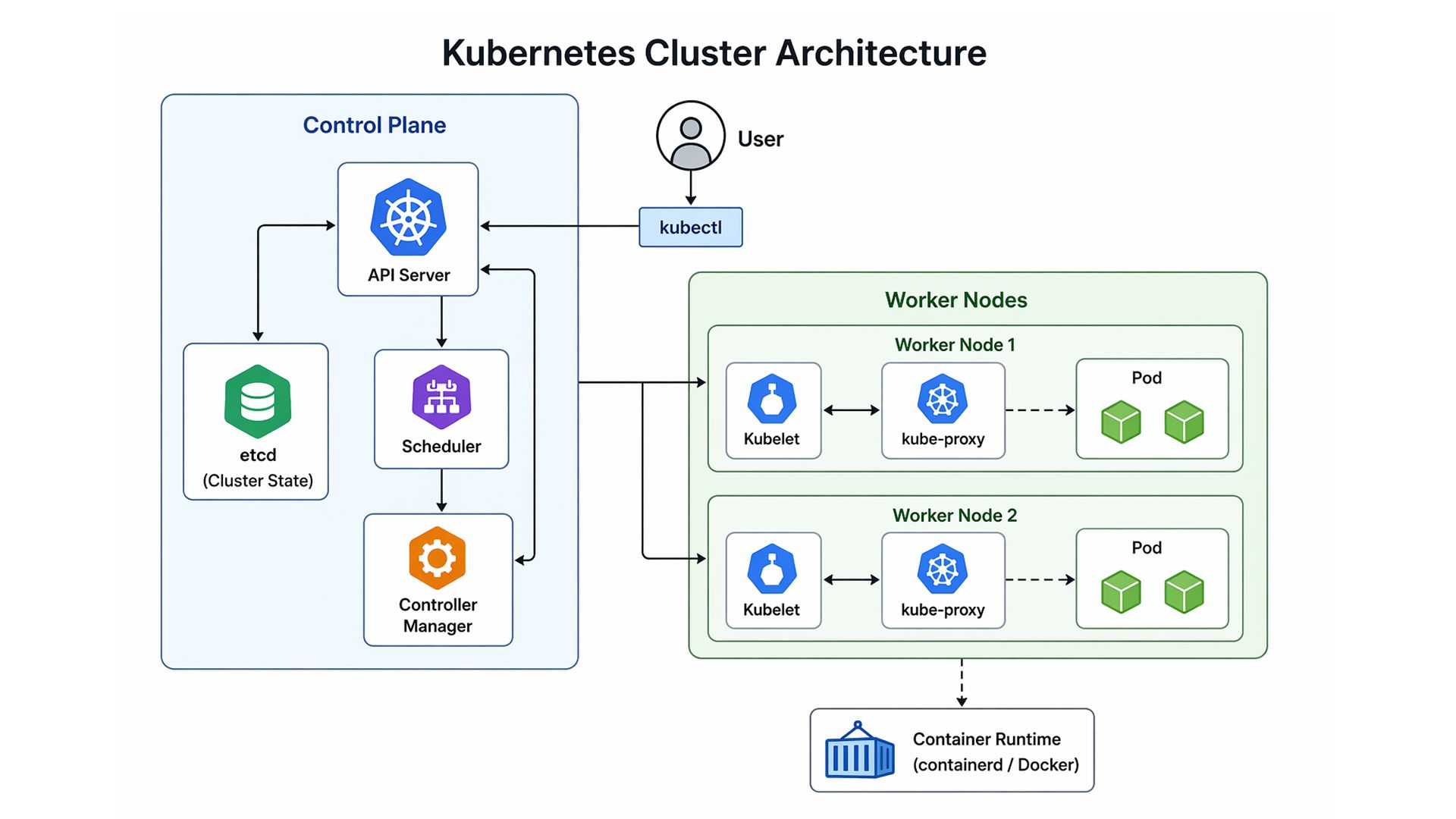
Kubernetes Cluster Architecture - Control Plane and Worker Node Interaction
The diagram illustrates how control plane components coordinate with worker nodes to execute and maintain workloads across the cluster.
When a user submits a deployment:
| kubectl apply -f deployment.yaml |
The request enters a structured pipeline.
It first reaches the API Server, which acts as the central gateway. The API Server validates the request and records the desired state in etcd. At this point, Kubernetes understands what the system should look like, but has not yet executed anything.
Next, the Scheduler evaluates available nodes and selects the most appropriate one based on resource availability and constraints. This decision directly affects system performance and efficiency.
Once a node is selected, the Controller Manager ensures that the system moves toward the desired state. It continuously monitors the system and triggers corrective actions if discrepancies are detected.
Finally, the Kubelet on the assigned node pulls the container image and starts the workload.
This process is not a one-time sequence. It is continuous and adaptive. If a pod crashes or deviates from its intended state, Kubernetes detects the issue and automatically replaces it.
This is what makes Kubernetes architecture fundamentally different: it is state-driven, event-aware, and continuously self-correcting.
3. Control Plane Components (The Decision Layer)
The control plane is the logical core of the Kubernetes cluster. It is responsible for maintaining consistency and ensuring that workloads behave as intended.
1. API Server
The API Server serves as the central communication hub. Every interaction with the cluster, whether manual or automated, flows through this component.
It is responsible for:
- Authenticating requests
- Validating configurations
- Coordinating communication between components
Without the API Server, the cluster cannot function cohesively.
2. etcd
etcd is a distributed key-value store that acts as the cluster’s memory.
It stores all critical information, including:
- Workload definitions
- Service configurations
- Cluster metadata
Because etcd is the single source of truth, its reliability is crucial. Data loss or corruption can compromise the entire cluster.
As a result, production systems prioritize redundancy, backups, and high availability for etcd.
3. Scheduler
The Scheduler determines where workloads should run within the cluster.
Its decisions are based on:
- Resource availability
- Node health
- Scheduling constraints
This component ensures efficient resource utilization and balanced workload distribution.
4. Controller Manager
The Controller Manager continuously monitors the system and ensures that the actual state aligns with the desired configuration.
If discrepancies arise, such as a missing or failed pod, corrective actions are initiated.
This introduces a defining principle of Kubernetes:
Kubernetes is not reactive - it is continuously corrective.
4. Worker Nodes (Execution Layer)
If the control plane acts as the brain of the Kubernetes cluster architecture, the worker nodes are the muscle. This execution layer is where your actual applications, APIs, and background processes reside. Unlike the control plane components, which are meticulously protected to maintain system state, Kubernetes worker nodes are fundamentally designed to be highly scalable, ephemeral, and entirely replaceable.
To successfully receive instructions from the API Server and execute workloads, every worker node relies on three critical internal services running in constant synchronization:
- Kubelet (The Node Agent): The Kubelet is the primary node agent and the direct line of communication to the control plane. It receives PodSpecs (pod specifications) from the API Server and continuously verifies that the defined containers are running and healthy. If a container crashes, the Kubelet attempts to restart it locally. Crucially, the Kubelet only manages containers created by the Kubernetes system, deliberately ignoring unmanaged processes on the host machine.
- Container Runtime (The Engine): While the Kubelet acts as the manager, the container runtime is the software that pulls images from a container registry, unpacks them, and runs the application processes. Modern Kubernetes clusters have deprecated Docker as the underlying runtime in favor of lightweight, highly optimized, strictly CRI (Container Runtime Interface) compliant options like containerd or CRI-O.
- Kube-Proxy (The Network Manager): This component manages network rules on the host machine (typically utilizing iptables or IPVS). Kube-proxy facilitates routing and network communication to your pods from network sessions inside or outside of your cluster, ensuring that traffic directed to a Kubernetes Service consistently reaches the correct pod execution environment.
5. The Pod Lifecycle: From Declaration to Execution
While worker nodes provide the computing power, Pods are the atomic, smallest deployable units within a Kubernetes cluster. A common misconception is that a pod is simply a container; in reality, a pod is a logical wrapper that encapsulates one or more closely related containers, shared storage volumes, and a unified network namespace.
Understanding the Kubernetes pod lifecycle is essential because a pod’s creation is not instantaneous; it requires a highly coordinated sequence of events.
When a new pod is declared, the following pipeline is triggered:
- Declaration and Storage: The API Server receives the pod specification, validates it, and commits this desired state into etcd. At this exact moment, the pod exists only as a database record.
- Scheduling and Binding: The Scheduler detects a newly created, unassigned pod. It evaluates the resource requirements and "binds" the pod to the optimal node.
- Execution: The Kubelet on the assigned node detects the binding. It instructs the container runtime to pull the required container images and start the application processes.
- Network Allocation: Concurrently, the cluster's Container Network Interface (CNI) assigns a unique internal IP address to the pod, integrating it into the cluster's flat network.
1. The Pod State Machine and Health Probes
Pods follow a strict state machine, typically moving from Pending (waiting for resources or image downloads) to Running (actively executing).
However, simply being in a Running state does not mean the application is ready to serve traffic. To ensure reliability, Kubernetes relies on automated health checks:
- Liveness Probes: Continuously verify if the application is fundamentally functioning. If a liveness probe fails, the Kubelet aggressively kills and restarts the container locally.
- Readiness Probes: Determine if the pod is ready to accept network traffic. If a readiness probe fails (e.g., the app is still loading a database cache), the pod is temporarily removed from the routing endpoints of its associated Kubernetes Services.
2. Designing for an Ephemeral Reality
The most critical aspect of the pod lifecycle is its ephemeral nature. Pods are fundamentally temporary. They are not designed to be patched or kept alive indefinitely. They can fail due to application crashes, be evicted if a worker node runs out of memory, or be terminated automatically during scaling operations. Because individual pods are untrustworthy, modern systems must be built to tolerate sudden pod death by relying on higher-level abstractions, like Deployments and Services, for operational stability.
6. Networking Inside a Kubernetes Cluster
Building upon the ephemeral nature of pods, Kubernetes networking represents a massive paradigm shift from traditional server environments. In older architectures, managing network traffic required complex, manual port-mapping and network address translation (NAT). A Kubernetes cluster elegantly bypasses this problem by enforcing a foundational rule: every pod receives its own unique IP address.
Powered by a Container Network Interface (CNI) plugin such as Calico, Flannel, or Cilium, a pod on Node A can communicate directly with a pod on Node B using its dedicated IP, just as if they were physical machines sitting on the same local area network.
1. Kubernetes Services: The Stable Abstraction
While direct pod-to-pod communication is technically possible, relying on pod IP addresses is a critical anti-pattern. Because pods are constantly created, destroyed, and rescheduled, their IP addresses are highly volatile.
To solve this, Kubernetes introduces Services. A Service acts as a stable, static load balancer for a logical grouping of pods. Even if the underlying pods are rapidly scaling up or being replaced, the Service maintains a persistent IP address. The underlying kube-proxy running on each worker node intercepts traffic destined for the Service and intelligently distributes it to the currently healthy backend pods.
2. Built-in DNS and Service Discovery
To make communication seamless for developers, a Kubernetes cluster ships with an internal DNS server, typically CoreDNS. When a Service is created, CoreDNS automatically generates a predictable DNS record for it.
For example, if you have a Next.js admin dashboard that needs to securely fetch user data from a backend Node.js authentication service, you should not hardcode IP addresses. The frontend simply communicates with the backend by resolving its fully qualified domain name (FQDN):
| backend-api.production.svc.cluster.local |
This built-in service discovery ensures that application configurations remain decoupled from the underlying infrastructure.
3. Ingress and Network Policies (Production Traffic Control)
Inside a default Kubernetes cluster, the network is fundamentally open. To secure internal cluster networking, administrators deploy Network Policies, which act as internal firewalls to enforce zero-trust security. Furthermore, internal Services are generally not accessible from the outside world. To route external HTTP/HTTPS traffic from users into the cluster, Kubernetes utilizes Ingress resources, which act as the cluster’s intelligent reverse proxy, terminating SSL certificates and routing external requests.
7. Scaling Behavior in a Kubernetes Cluster
If Kubernetes networking ensures that traffic seamlessly reaches your applications, Kubernetes autoscaling ensures those applications survive when that traffic suddenly spikes. Scaling is arguably the most powerful capability of a Kubernetes cluster, transitioning it from a static container orchestrator into an elastic, dynamic cloud engine.
Unlike traditional deployments, where scaling requires manual intervention, Kubernetes employs a highly reactive, multi-layered scaling strategy.
1. Application-Level Scaling: HPA and VPA
At the workload level, Kubernetes dynamically adjusts to real-time demand using two primary mechanisms, both of which rely on the internal Metrics Server.
- Horizontal Pod Autoscaler (HPA): The most common scaling mechanism. It monitors specific metrics (like CPU or memory). If a highly trafficked application, such as a cloud pricing calculator aggregating live metrics from AWS, Azure, and GCP APIs, experiences a sudden surge of enterprise users, the HPA automatically modifies the Deployment to increase the replica count. Once demand subsides, it scales the replicas back down to conserve resources.
- Vertical Pod Autoscaler (VPA): While the HPA adds more pods, the VPA adds more compute power to existing pods. It observes historic resource usage and automatically adjusts the CPU and memory requests of the pod specifications, ensuring databases or legacy applications do not hit Out-Of-Memory limits.
2. Infrastructure-Level Scaling: The Cluster Autoscaler
Application-level scaling has a strict physical limit: the available capacity of the worker nodes. If the HPA requests 50 new replica pods during a massive traffic spike but the existing worker nodes are fully saturated, those new pods will become stuck in a Pending state.
This is where the Cluster Autoscaler comes into play. Operating at the infrastructure layer, it automatically communicates with your cloud provider’s API to provision brand new worker nodes. Once the new nodes boot up, the Scheduler immediately assigns the waiting pods. Conversely, when cluster utilization drops, it safely drains running pods and terminates underutilized virtual machines to prevent unnecessary cloud billing.
8. Real-World Cluster Behavior (Production Perspective)
Real-world production is messy. While tutorials often present a sanitized view of orchestration, a true understanding of a Kubernetes cluster comes from observing its behavior under stress. In an enterprise environment, hardware degrades, network packets drop, and sudden traffic spikes are the norm.
The core philosophy here is simple:
“Kubernetes does not aim to eliminate failure; it assumes failure is inevitable and is engineered to recover from it automatically.”
1. The Mechanics of Self-Healing
When a worker node experiences a hardware failure or a kernel panic, the cluster initiates a pre-programmed recovery sequence:
- Detection: The control plane notices the missing kubelet heartbeat and marks the node's status as NotReady.
- Taints and Eviction: The cluster applies an unreachable taint and forcefully marks all pods on that node for eviction.
- Rescheduling: The Scheduler identifies the missing replicas and provisions replacement pods on the remaining healthy worker nodes.
- Reconciliation: The system fully restores the declared "desired state" without any manual intervention.
2. Handling Network Partitions
If a node loses connection to the control plane but remains "alive" (a Split-Brain scenario), Kubernetes handles this cautiously. It will eventually reschedule pods to maintain availability, and if the original node reconnects, the cluster automatically terminates the "ghost" pods to prevent data corruption.
9. Common Kubernetes Cluster Mistakes (Deployment Antipatterns)
Even the most sophisticated, self-healing Kubernetes cluster is only as stable as the configurations you feed it. Many teams treat Kubernetes like a traditional VM and inadvertently introduce "antipatterns" that lead to instability.
To maintain a healthy production environment, you must avoid these five common pitfalls:
1. The "No Limits" Trap
Deploying pods without resource constraints is a liability. Without strict requests and limits, a single memory leak in a microservice can starve the entire worker node of resources. This triggers an aggressive OOMKilled (Out of Memory) event, potentially crashing unrelated, healthy pods sharing that node.
The Fix: Always define resource boundaries in your YAML:
resources: memory: "256Mi" |
2. Observability Blind Spots
In an ephemeral cluster, you cannot rely on SSH to debug a problem. By the time you try to log in, the pod might have been rescheduled or destroyed. Without centralized monitoring, diagnosing production issues becomes a guessing game.
The Fix: Implement a robust observability stack like Prometheus for metrics and Grafana for visualization from day one. You need to see the "health" of your cluster in real-time, not after a crash.
3. Premature Overengineering
Kubernetes is a heavy-duty engine built for complex, distributed workloads. Forcing a simple, static landing page or a small monolith into a cluster often introduces more operational overhead than it solves.
The Fix: Evaluate the "Complexity Threshold." If a managed PaaS (Platform as a Service) can handle your traffic with less friction, use it. Save Kubernetes for when you truly need its scaling and orchestration power.
4. Namespace Dumping
Deploying every application, database, and tool into the default namespace creates architectural chaos. It makes it impossible to apply granular security policies or manage resource quotas effectively.
The Fix: Use Namespaces paired with Role-Based Access Control (RBAC). This allows you to strictly isolate microservices, ensuring that a vulnerability in a frontend component doesn't provide a clear path to your backend authentication service.
5. Ignoring Health Probes
Without Readiness and Liveness probes, Kubernetes is "blind" to your application's internal state. If your app takes 20 seconds to connect to a database, but the cluster starts routing traffic immediately, your users will hit 502 Bad Gateway errors.
The Fix: Use probes to tell the cluster when a pod is actually ready to work.
- Liveness: "Am I still alive, or do I need a restart?"
- Readiness: "Am I ready to handle user traffic?"
10. When You Should Use a Kubernetes Cluster
Despite its dominance in the cloud-native ecosystem, Kubernetes is not universally applicable. It is a highly specialized, heavy-duty distributed system engine.
1. When Kubernetes Shines (The Sweet Spot)
A Kubernetes cluster provides massive ROI when your infrastructure requirements demand:
- Microservices Architecture: If you are building decoupled systems, for example, an administrative dashboard built with sophisticated IBM Carbon Design System UI components on the frontend, communicating securely with a robust backend authentication service utilizing Node.js, Express, MySQL, and a Redis caching layer, Kubernetes provides the exact networking, routing, and isolation capabilities needed to manage these distinct moving parts effectively.
- Dynamic Workload Management: Applications experiencing unpredictable traffic spikes benefit immensely from Kubernetes layered autoscaling.
- High Availability and Fault Tolerance: For mission-critical data processing platforms, the built-in self-healing mechanisms ensure the system remains online even if the underlying infrastructure fails.
- Cloud Agnostic Portability: Kubernetes provides a standardized API allowing organizations to migrate seamlessly between AWS EKS, Google GKE, or Azure AKS.
2. When to Walk Away (The Anti-Patterns)
Conversely, forcing a project into a Kubernetes environment when it doesn't fit the profile is a massive drain on engineering resources. It is generally not suitable for simple static workloads, tight monolithic applications, or development teams lacking dedicated operational and site reliability engineering expertise.
3. The Complexity Threshold (Operational Tax)
The ultimate deciding factor is the "Complexity Threshold." If your primary engineering challenges are application-level (writing features), Kubernetes will only slow you down. However, if your primary bottlenecks have shifted to infrastructure challenges, struggling to deploy multiple services simultaneously, failing to scale components independently, or suffering server crashes, you have crossed the threshold where the operational tax of Kubernetes is finally worth paying.
11. Kubernetes Cluster vs Traditional Deployment
Transitioning to a Kubernetes cluster requires a shift from managing "Pets" to managing "Cattle." Traditional servers are Pets: unique, meticulously maintained, and manually patched. In a cluster, workloads are Cattle: identical, ephemeral, and instantly replaced if they fail.
The Comparison Matrix
| Feature | Traditional Systems (VMs / Bare Metal) | Kubernetes Cluster (Cloud-Native) |
| Scaling | Manual: Requires provisioning new VMs via scripts. | Automated: HPA and Cluster Autoscaler react to real-time metrics. |
| Recovery | Reactive: Crashes require manual engineer intervention. | Proactive: Failed probes trigger automated container restarts. |
| Deployment | Imperative: Step-by-step manual execution. | Declarative: The control plane enforces a defined YAML desired state. |
| Resource Usage | Static: Servers often sit idle, leading to wasted spend. | Dynamic: Workloads are "bin-packed" for maximum density. |
Dynamic Bin-Packing: The Economic Advantage
In traditional systems, you often run a VM at 20% capacity just to keep a service isolated. Kubernetes solves this via Dynamic Bin-Packing. Because containers are isolated at the kernel level, the Scheduler can safely place a memory-heavy cache and a CPU-heavy worker on the same node, drastically reducing cloud computing costs.
12. Why Kubernetes Clusters Matter
At its core, a Kubernetes cluster is far more than just a sophisticated container management tool. As we’ve explored through its internal architecture and real-world production behavior, it operates as a comprehensive, intelligent operating system designed to handle the complexity of modern, distributed workloads with maximum efficiency.
By abstracting away the physical hardware and relying on a strict declarative model, Kubernetes systematically eliminates the manual toil of traditional deployments. It provides a guarantee of automated recovery, intelligent scheduling, and dynamic, multi-layered scaling that was previously only available to tech giants with massive operations teams.
The Resilience Paradigm
Operating within a Kubernetes environment requires a fundamental shift in engineering philosophy. It forces us to embrace the reality of ephemeral infrastructure. When you architect applications knowing that the underlying pods and nodes will inevitably fail or be replaced, you naturally build systems that are highly decoupled and intensely resilient.
By fully adopting this model, you stop viewing infrastructure as something to be "fixed" and start viewing it as a self-healing resource that works for you.
The final takeaway: Kubernetes matters because it allows you to stop fighting infrastructure fires and start doing what you actually love: shipping reliable, infinitely scalable software that changes how users interact with the world.

