
How CDN Works: Request Routing, Caching, and Edge Delivery
When someone in Pune opens a website that's hosted on a server in Virginia, the page can still load in under a second. That's not because the data is traveling faster than usual. It's because the request may be handled by a CDN edge location much closer to Pune instead of reaching the origin server in Virginia.
A Content Delivery Network (CDN) is a globally distributed network of edge servers that helps deliver content closer to users. When content is already cached at an edge location, the CDN can serve it directly without contacting the origin for every request.
But caching content closer to users is only part of the story. The more useful questions are: How does a request find the right edge location? What happens when the content is already cached? What happens when it isn't? And how does the CDN deliver the response efficiently back to the browser?
This article follows a CDN request through those stages in the order they occur: request routing, edge caching, and content delivery.
1. What a CDN Actually Is
A Content Delivery Network (CDN) is a globally distributed network of servers, commonly organized into Points of Presence (PoPs), that brings content closer to users. Each PoP can cache frequently requested content at the edge, allowing users to receive resources from a nearby location instead of sending every request back to a single origin server.
The origin server remains the authoritative source for the application's content. When the requested content is already available and valid at an edge PoP, the CDN can serve it directly. When the content is not cached, or the cached copy is no longer valid, the edge retrieves the latest content from the origin, stores it according to the configured caching rules, and serves it to the user.
This separation between the origin and edge locations is what allows a CDN to reduce latency, handle high request volumes, and reduce the amount of traffic reaching the origin infrastructure. Instead of every user request traveling back to the origin, frequently requested content can be served directly from the edge.
2. CDN Architecture at a High Level
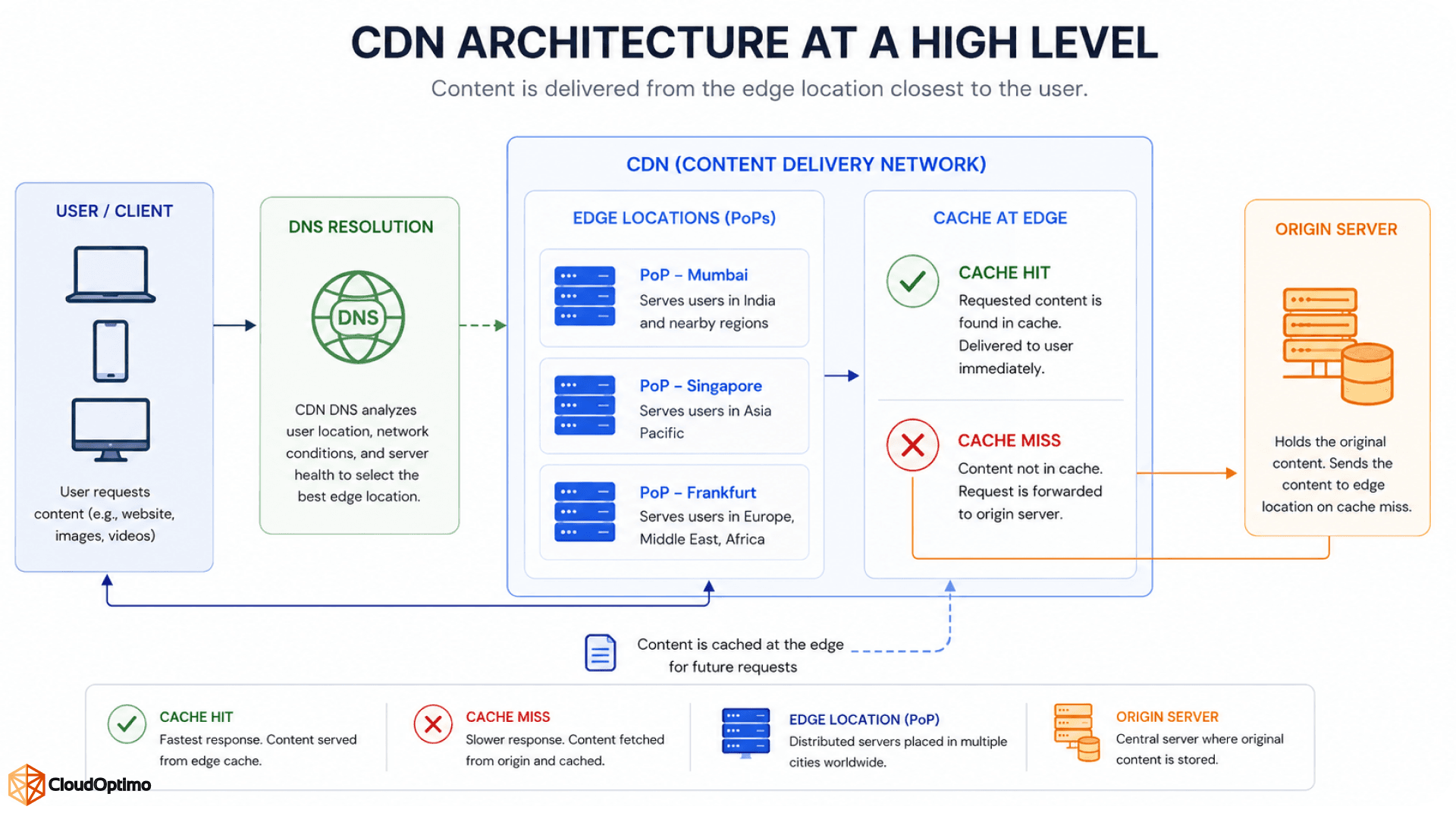
Before getting into routing and caching individually, it helps to see how the pieces of a CDN work together. A typical request involves four key components: the user's device, the routing layer, the edge PoP, and the origin server.
The routing layer determines which Point of Presence (PoP) should handle the request. Once the request reaches that edge location, the CDN checks whether the requested content is already available in its cache. If it is, the edge can serve the response directly. If it isn't, the edge retrieves the content from the origin server, caches it according to the configured rules, and then returns the response to the user.
At a high level, the request flow looks like this:
| User → Routing Layer → Edge PoP → Origin (if needed) → Edge PoP → User |
This flow provides the basic mental model for understanding how a CDN works. The architecture can become more sophisticated with features such as multi-tier caching, load balancing, security controls, and origin failover, but the fundamental request path remains the same.
The diagram below illustrates this high-level architecture. The rest of the article breaks down each stage to explain how routing, caching, and edge delivery work in practice.
 3. Request Routing: Finding the Nearest Edge
Before a browser can request a page, it has to resolve a domain name to an IP address. CDNs use this DNS step to steer traffic toward the right PoP, but they don't all do it the same way. Three approaches show up most often in production CDNs.
DNS-based routing works by giving different users different IP addresses when they resolve the same hostname. The CDN's DNS servers look at where the request is coming from and return the address of a nearby PoP. This is simple to reason about, but it depends on the resolver's location being a decent proxy for the user's actual location, which isn't always true with public DNS resolvers.
Anycast routing takes a different path. The same IP address is announced from many PoPs at once using BGP, and internet routing itself decides which PoP a packet reaches, based on network distance rather than geography. It reacts faster to outages because traffic simply reroutes at the network layer if a PoP disappears from the routing table.
GSLB, or Global Server Load Balancing, adds another layer of intelligence on top of either method. Instead of routing purely on proximity, it also factors in current server load, health checks, and even cost, so a nearby PoP that's overloaded or unhealthy doesn't keep receiving traffic.
| Routing Method | How It Decides | Where It Works Best |
|---|---|---|
| DNS-Based Routing | Uses DNS responses to direct users toward an appropriate PoP based on factors such as resolver location | General web delivery and simpler routing setups |
| Anycast Routing | Uses BGP to route traffic to the appropriate PoP advertising the same IP address | Low-latency delivery and DDoS-resilient architectures |
| GSLB | Combines factors such as proximity, health, server load, and routing policies | Large-scale, multi-region deployments |
Most large CDNs actually combine these. Anycast gets a request to a nearby cluster of servers, and GSLB or a local load balancer picks the healthiest, least loaded machine within that cluster.
4. Caching at the Edge: Hits, Misses, and TTLs
Once a request lands on an edge PoP, the server checks whether it already has a valid copy of the requested object. This single check, cache hit or cache miss, is the difference between a response in a few milliseconds and one that has to travel back to the origin.
On a cache hit, the edge server serves the stored copy directly. No origin round trip, no rebuilding the response, just handing back what's already sitting on local disk or in memory. On a cache miss, the edge server has to fetch the object from the origin (or from a nearby parent cache, in a multi-tier setup), store a copy locally, and then respond to the user. The first request for a given piece of content is almost always a miss; the ones that follow benefit from it.
How long an object stays cacheable is controlled by HTTP headers set on the origin's response, mainly Cache-Control. Getting these right matters more than people expect, because a badly configured header either serves stale content for too long or forces the CDN to hit the origin far more often than it needs to.
| Directive | What It Does |
|---|---|
| max-age | How many seconds a response can be reused before it's considered stale |
| s-maxage | Same idea as max-age, but applies specifically to shared caches like a CDN, overriding max-age for them |
| no-cache | Allows caching, but the cache must revalidate with the origin before reusing it |
| no-store | Tells the cache not to store the response at all |
| stale-while-revalidate | Serves the stale copy immediately while fetching a fresh one in the background |
| immutable | Tells the cache the content will never change during its freshness window, so skip revalidation entirely |
A good rule of thumb: version your static assets (bundle.abc123.js instead of bundle.js) and set long max-age values on them, since a new deployment simply changes the filename. For HTML pages or API responses that change often, shorter TTLs or no-cache with revalidation make more sense.
Cache keys matter just as much as TTLs. By default, a CDN typically caches based on the URL, but it can also be configured to vary the cached copy by things like query parameters, cookies, or the Accept-Language header. Getting this wrong causes two common problems: caching too broadly serves the wrong content to the wrong users, while caching too narrowly (say, including a session-specific cookie in the key) turns every request into an effective cache miss.
5. Edge Delivery: Getting the Response Back Fast
Once the CDN has determined where the content should come from, the next goal is to deliver that response to the user's browser as efficiently as possible. The edge location acts as the user's closest point of contact with the CDN, handling connection setup, protocol negotiation, compression, and other optimizations before sending the response over the network.
TLS termination is commonly handled at the edge, allowing the browser to establish its secure connection with a nearby CDN location rather than performing that part of the connection setup with the origin. This can reduce the network distance involved in establishing the connection and allows the CDN to handle HTTPS traffic closer to the user.
Modern CDNs also support HTTP/2 and HTTP/3, which improve how multiple resources are transferred over a connection. Instead of treating every resource as an independent connection, these protocols allow browsers to efficiently request and receive multiple resources, reducing connection overhead and improving page-load performance.
The connection between the edge and the origin can also be optimized. CDNs commonly reuse persistent connections to the origin, so repeated requests do not necessarily require a new TCP and TLS connection each time. This is particularly useful when the CDN needs to fetch content after a cache miss or when serving dynamic content that cannot be cached.
Compression and Content Optimization
The edge can also reduce the amount of data that needs to travel to the browser. Text-based responses such as HTML, CSS, JavaScript, and JSON can be compressed using formats such as Brotli or Gzip, reducing payload size and allowing the browser to receive the content more quickly.
Some CDNs also provide image optimization at the edge. Images can be resized, compressed, or converted into more efficient formats based on the requesting device and configured delivery rules. For example, a mobile device may receive a smaller image than a desktop browser, avoiding the unnecessary transfer of a large image that will ultimately be displayed at a much smaller size.
Together, these edge-level optimizations reduce the amount of data transferred, minimize connection overhead, and help the browser receive usable content faster.
6. Cache Invalidation and Purging
Caching improves performance by allowing the CDN to reuse content at the edge, but cached content can become outdated when the underlying resource changes. Waiting for the configured TTL (Time to Live) to expire is not always sufficient, especially when a deployment contains an important fix, a security update, or content that must become available immediately. CDNs therefore provide cache invalidation mechanisms that allow stale objects to be removed or revalidated before their normal expiration time.
A common approach is cache purging. The application, origin, or deployment pipeline sends an invalidation request to the CDN, identifying the content that needs to be refreshed. Depending on the CDN, the purge can target a specific URL, a group of URLs, a cache tag, or an entire path. Once the cached object is removed or marked stale, the next request can retrieve the latest version from the origin.
There are two common strategies for handling invalidation:
- Hard purge: The cached object is removed immediately. The next request becomes a cache miss and the CDN fetches a fresh copy from the origin.
- Soft purge or stale marking: The cached object is marked as stale rather than immediately discarded. Depending on the CDN configuration, the stale response may continue to be served temporarily while the CDN retrieves a fresh version in the background.
The choice depends on how quickly the updated content must reach users and how much additional traffic the origin can handle. An immediate purge provides stronger freshness guarantees, while stale-while-revalidate approaches can reduce the sudden increase in origin requests that may occur when large amounts of content expire at the same time.
For production deployments, cache invalidation is best integrated into the CI/CD pipeline rather than performed manually. For example, a deployment can update the application, publish the new assets, and then trigger a targeted CDN invalidation for resources that changed. Even better, versioned or content-hashed assets such as app.a83f21.js can avoid unnecessary purges altogether because each deployment generates a new URL.
The goal is not to purge everything after every deployment. Targeted invalidation and versioned assets provide a better balance between content freshness, cache efficiency, and origin protection.
7. Measuring Whether the CDN Is Actually Helping
It's easy to assume a CDN is doing its job simply because it's enabled. The better way to evaluate it is to look at metrics such as cache hit ratio, origin offload, Time to First Byte (TTFB), response time, and error rate. A high cache hit ratio means more requests are being served directly from the edge without reaching the origin, while origin offload shows how much work the CDN is removing from the application's infrastructure. TTFB and response time help measure how quickly users are receiving responses, while error rates can reveal problems occurring at the edge or origin.
A low cache hit ratio can be a sign that caching rules need attention. Common causes include cache keys that are too specific, TTLs that are too short, responses marked as non-cacheable, or request attributes such as cookies and query parameters creating unnecessary cache variations. Monitoring these metrics over time is also important because a sudden drop in cache hit ratio or increase in origin response time after a deployment can reveal a configuration or performance problem. The goal is not simply to maximize every metric, but to ensure that cacheable content is served efficiently, unnecessary origin traffic is reduced, and users receive responses quickly and reliably.

